Optimizing FICON for Hidden Mainframe Cost Savings
John Shuman, retired Distinguished Engineer, points to a major opportunity across mainframes—enhancing efficiency of port/channel environments
Competitors to the mainframe have been touting the end of the platform for literally decades. But anyone that has spent a lifetime in support of IT knows it is a workhorse and still the most secure platform on the planet. It is not the right platform for every solution, but neither is it close to obsolete—in fact, just the opposite.
The mainframe has evolved dramatically. The IBM Newsroom touts the ability of the z17 processor to “perform 450 billion artificial intelligence (AI) inference operations per day,” while allowing scoring of “100% of a client’s real time transactions.” While most distributed systems are satisfied with 60-80% utilization, thousands of virtual servers can drive a mainframe to 100% without impact to throughput.
But the loss of deep expert knowledge is a real problem and hits hardest in the areas of performance, capacity planning and cost efficiency. After looking at hundreds of mainframe systems, I find that the average system can run 30% cheaper than as currently configured. More importantly, a key strategy is missing.
To tune any system, one has to understand who is using it and why. Not big entities like corporations or internal divisions, but the distinct individuals logging in. This is the first in a series of articles identifying methods to harvest millions in wasted capacity. The following is one of the most profitable, and possibly most surprising, areas to mine.
[h2] Investment in Solution Design Oversight Is critical
Fibre connection (FICON) directors have been evolving alongside the mainframe. As S/370 parallel channels replaced enterprise system connection (ESCON), and as ESCON gave way to FICON, data transfer have exploded from 4.5 MB/sec to 32 GB/sec. This is a processor limitation, since GEN8 FICON switches are already offering 128 GB/sec.
During this time, Broadcom purchased INRANGE, McDATA, Brocade and CNT, leaving CISCO and Broadcom as the dominant switch manufacturers. Technology features also blossomed, with high availability, increased scalability, lower network latency, fewer single points of failure (SPOF), hot-pluggable components and non-disruptive software upgrades. AI, analytics and AIOPS services are now sold by the port.
Per-gigabyte storage costs drop over time, but costs for FICON directors and services per port continue to climb. Defining the optimal channel/port environment becomes more critical than ever.
In some cases, clients are forced to rely on vendors for sizing. In other cases, they turn to service providers. I once saw proposals adopted from a hardware sales rep, who was paid commission based on the size of the purchase, that included all the bells and whistles.
The bottom line is that only you understand your business and that of your clients’. Investments have to be made in oversight to ensure efficiency. The loss of mainframe technicians with deep knowledge has led to poor assumptions that create unnecessary cost.
Your Channel/Port Environment: What Not to Do
Let’s look at the worst case I’ve discovered. It involves a 50 TB disk subsystem connected to four directors and four processors. It illustrates the pitfalls of using “standard” sizes without understanding client requirements or the “speeds and feeds” of the devices. Two other purchases were caught up in these “standards,” but the waste was not nearly as onerous. Many IT environments have lost sight of this gray area.
The diagram below shows how these nine devices were interconnected. The architect designing the solution arbitrarily chose to add 16 of the four-channel cards. In order to keep this simple, ignore the fact that 64 ports were also provisioned for Metro and Global Mirror. Also excessive, but involving a different analysis.
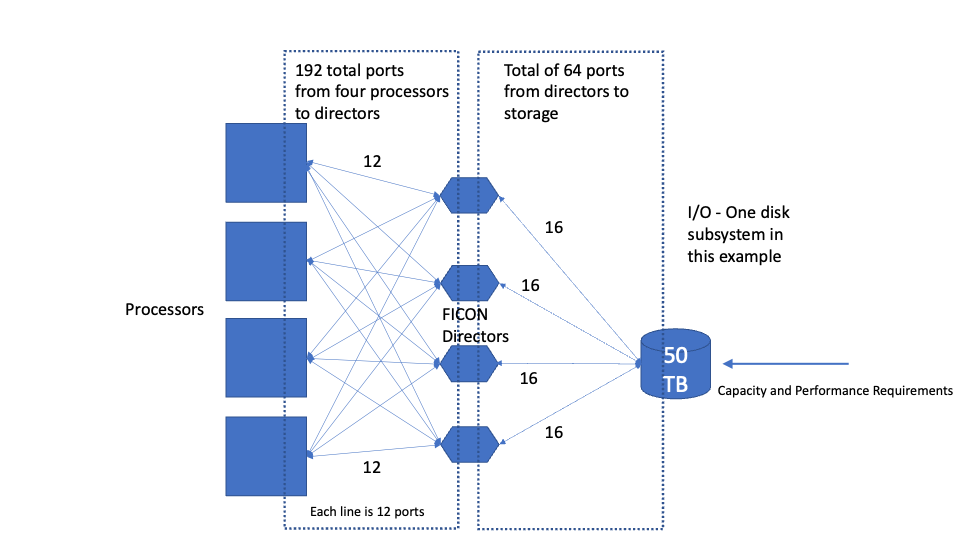
Figure 1. In this worst-case example, four processors, four directors and a 50 TB subsystem are connected.
A Channel/Port Environment Framework
To determine the optimal channel/port environment, we apply the following framework:
- Ports on directors, disk and processors cost $6,000 each (depends on vendor contracts)
- 32 GB channels can handle 300,000 I/Os per second. Use performance monitor data to check all assumptions. This is the most critical aspect of the design phase.
- Ideally connect to four directors to reduce the number of required ports for resiliency. Create a solution that can handle the loss of one director in that group.
- Create a solution that relies on expected capacity needs for the next 12-18 months. Do not solution for the life of the director, which often spans 10 years. This controls costs over time and avoids the difficult challenge of trying to reclaim or move connectivity.
- Consider shortrange (SR) channels (50 micron) as an option. SR channels are 60% of the cost of longrange (LR) channels (9 micron), depending on vendor agreements. But there are limitations to consider:
- A device with SR ports (transceivers) can only be cabled to another device with SR ports. This may require an initial investment in “bubble” costs.
- SR ports have distance limitations. The device must be withing 300-400 meters (depending on cable type) while LR devices can be approximately 10 kilometers away.
- To excel, determine how each processor is going to use the disk. Rarely is it spread evenly among processors. To fine-tune the number of channels, use peak channel and disk reports (channel utilization and PEND time in particular) from each LPAR accessing the disk (combined). If possible, find existing examples from a similar application. Learn who is accessing the data and how often. If the risks are too high, then add extra channels, but consider removing them later if unnecessary. The payoff can be substantial.
- IBM Redbooks “IBM b-type Gen 7 Installation, Migration, and Best Practices Guide” (March 2022) is a good resource.
Comparing Port/Channel Environment Costs
Data from a similar application suggests the disk will only drive four channels. Even though enterprise-class disk components are redundant, we are still risk-averse and always ensure the design includes a minimum of two cards (eight ports). If there is a particularly critical application that is sensitive to I/O, increase it to 12 or 16 ports. For this example, we will use 16.
Table 1. Comparing a 16-Port Solution to the Worst-Case 64-Port Solution
| Cabling for 16 ports, four directors, four processors | Cabling for 64 ports, four directors, four processors |
| 4 ports from disk to each director | 16 ports from disk to each director |
| 3 ports from each director to each processor | 12 ports from each director to each processor |
| Total of 48 ports from directors to processors | Total of 192 ports from directors to processors |
| Total of 64 ports for the solution | Total of 256 ports for the solution |
| LR (9 micron): 64*$6000 = $384K | LR (9 micron) 256*$6000 = $1.536M |
| SR (50 micron): 64*($6000*.6) = $230.4K | SR (50 micron): 256*($6000*.6) = $921.6K |
The best solution based on historical peak actuals might look like this:
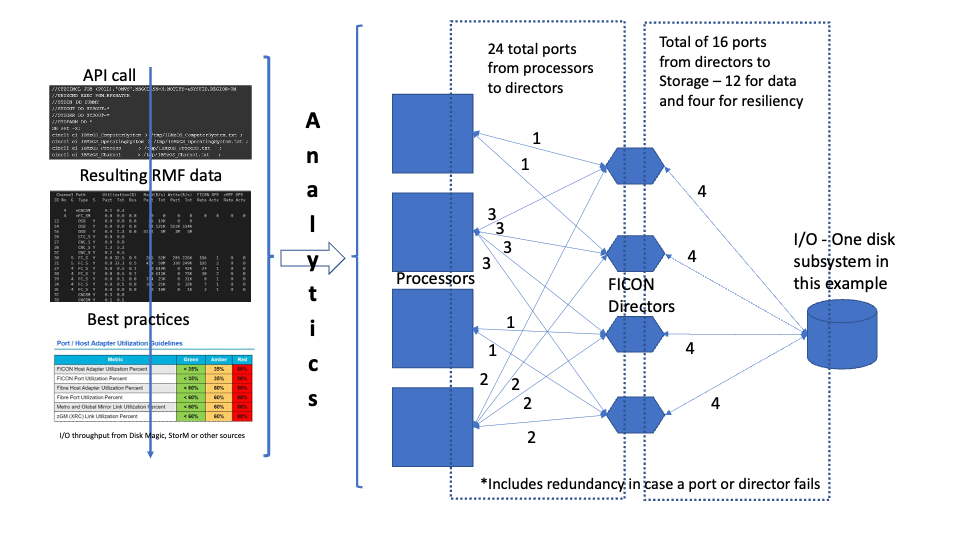
Figure 2. What an optimal channel/port configuration might look like, based on historical performance data.
Table 2. The Financial Math for an Optimal Channel/Port Configuration
| Cabling for 16 ports from disk, four directors, four processors |
| EXPLOIT ACTUALS and ANALYTICS FROM CLIENT DATA |
| Four ports from disk to each director |
| Cabling determined by actual utilization plus buffer |
| Possibly <24 channels from directors to processors |
| Total 32-40 ports for the solution |
| LR (9 micron) 40*$6000 = $240K |
| SR (50 micron) 40*($6000*.6) =$144K |
It is very difficult and time-consuming to determine exactly how many peak I/Os each LPAR is going to drive to the storage. The solution suggests the disk will drive 16 or fewer channels. Unless there is an LPAR that is clearly more demanding, adding 12 channels to each processor is a safe bet. This is what we consider the “average” solution. And with all its additions for risk, it still costs 75% less than the worst-case solution (LR $240K versus LR $1.536M).
The SR solution costs less than 10% of the worst-case solution, but as stated above requires time and careful planning to make a dramatic impact to the bottom line.
FICON: An Overlooked Expense—and Opportunity
I have never seen a storage device cabled optimally with respect to actual LPAR utilization. I have seen attempts to add SR channels during disk tech refresh, but workloads have stymied larger migration projects. This points to a major opportunity across all mainframes in all industries.
The numbers above represent the worst case, but varying degrees of this problem are rampant. Organizations must learn to couple efficiency training with more advanced client knowledge. Whatever your plans may be in the long term, whether staying on the mainframe or migrating to cloud, careful examination of your FICON director design can yield surprising opportunity.