Creating a Microservice API on Z: A Product-by-Product Primer
In this edition of the 'IBM Z Experience,' Joe Gulla explains how IBM's z/OS Connect, API Connect and DataPower come together to build, administer and protect APIs

It strikes me that if I started my programming career now, and not in 1979, I might be an API programmer instead of a COBOL programmer. That’s how important the API layer is to the modern mainframe.
In this article, I explain how three IBM products work together to build, manage and secure that API layer.
The first product I feature is IBM z/OS Connect (formerly known as z/OS Connect Enterprise Edition or z/OS Connect EE). z/OS Connect provides a framework for exposing z/OS applications and data as RESTful APIs and invoking external APIs from z/OS environments. Next, I feature the management product IBM API Connect, which is used to administer the microservices that expose the APIs. Lastly, I look at IBM DataPower Gateway, which is used to make the APIs secure.
Makes sense, right? You make it, manage it and secure the process and data while it’s running. Let’s start with the first product.
The Place to Start Is IBM z/OS Connect
If you plan use z/OS Connect to create APIs that run on IBM Z and z/OS, you might wonder—what kind of computer do I need to write APIs using this product? Other questions might arise. What supporting products are required? Does the product use an under-the-covers DBMS to contain definitions? Once I have an API created, what form does it take? Are the API definitions in a file, or modules, or what? These are questions that I will answer in this section.
What Computer Do You Need?
If your plan is to develop APIs that run through IBM z/OS Connect , the workstation requirements are straightforward, since most of the heavy lifting occurs on the z/OS system where z/OS Connect runs. You can develop z/OS Connect APIs on a Windows PC, a Linux workstation or a macOS workstation.
Typical development tools include Visual Studio Code with IBM z/OS Connect Development Tools or Eclipse-based z/OS Connect tooling or Git and YAML/OpenAPI editors. IBM’s Visual Studio Code Extension supports creating API provider and API requester projects directly from the workstation. There are simply a lot of options of what tools to use. For hardware, a reasonably modern laptop with 16 GB RAM, a multi-core Intel or AMD processor and VS Code and Java installed is generally sufficient.
Table 1. Visual Studio Code Extension Tool Capabilities
| Capability | Significance |
| Project creation and management | Create API provider and API requester project structures with appropriate directory layout and configuration files. |
| Language structure generation | Generate COBOL copybooks and PL/I include files from OpenAPI 3.0 documents. |
| Built-in validation | Validate options.yaml configuration files with real-time feedback on required parameters and correct values. |
| Code snippets | Access pre-built code snippets for building API requester applications, which accelerates development. |
| Gradle plug-in integration | Easily integrate with z/OS Connect Gradle plug-ins to build WAR files for deployment. |
What Runs on IBM Z?
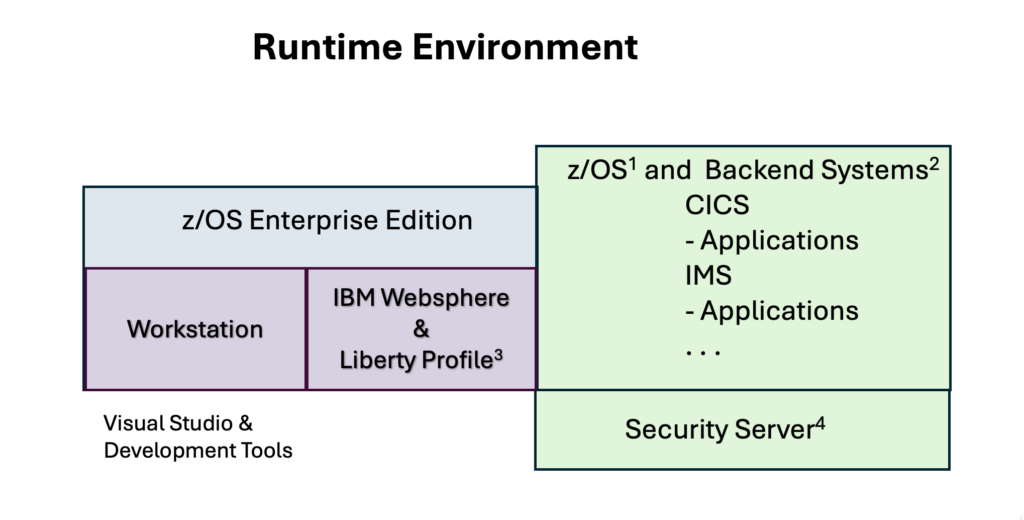
The runtime environment requires four items. There is IBM z/OS that supports backend environments like CICS, IMS, etc. running business applications. There is IBM z/OS Connect, which runs in IBM WebSphere using the Liberty profile and, finally, security infrastructure supported by Security Server (RACF).
What Back-End Environments Do You Typically Connect With?
z/OS Connect does not do business processing itself. It exposes existing applications and services. Common supported environments include CICS programs, IMS transactions, IMS databases, Db2 for z/OS, batch applications and Java applications. IBM provides sample APIs connecting to CICS, IMS and Db2. The list below includes an OpenAPI 3 repository with 5 examples:
Table 2. OpenAPI 3 repositories from IBM
| Repository Name | Brief Description |
| sample-db2-api | A sample API project showing how to connect to Db2 native Representational State Transfer (REST) services. |
| sample-cics-api | A sample API project showing how to connect to CICS Transaction Server. |
| sample-ims-api | A sample API project showing how to connect to IMS. |
| sample-oas3-requester | A sample z/OS Connect API requester project showing how to call an OpenAPI Specification 3.x. (OAS3) defined API from a CICS COBOL application. |
| sample-cics-api-first | A sample API project showing how to connect to CICS Transaction Server using the API first approach. |
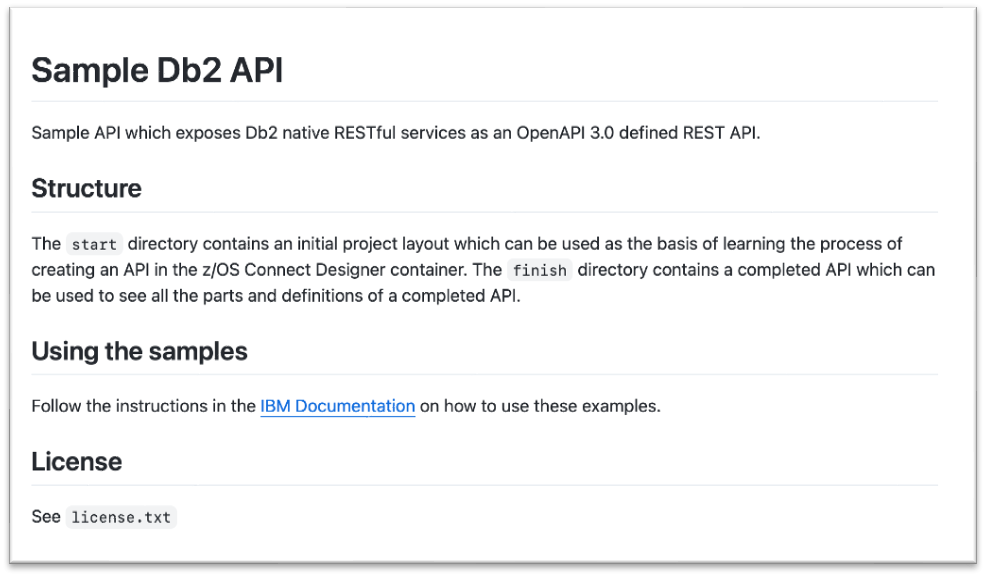
The figure below is a snippet related to the sample-db2-api, which gives you an idea of the detail behind the sample repositories.
Does z/OS Connect Require a Database to Store Definitions?
Unlike some other products, z/OS Connect does not require a DBMS repository to store API definitions. API metadata is generally stored as files and deployed to the z/OS Connect runtime filesystem.
What Is the Stuff that Makes up APIs?
There are three categories of elements generally called development artifacts. These include:
1. Service Archive (SAR) – A service definition that describes how z/OS Connect calls a backend resource such as CICS, IMS, Db2 and Java. The archive is packaged as a .sar file.
2. API Project – The REST API definition itself contains OpenAPI, YAML, JSON schema and Mapping definitions. These are created in the development tools.
3. API Requester WAR – When generating an API requester, deployment artifacts are packaged as: myapi.war and deployed to Liberty.
Where Are They Stored on z/OS?
Typically, artifacts like definitions and apps are stored in z/OS UNIX (USS) directories such as:
/var/zosconnect/
/server/apps/
/resources/zosconnect/
The server configuration references those deployed archives.
How About a Typical API Provider Development Flow?
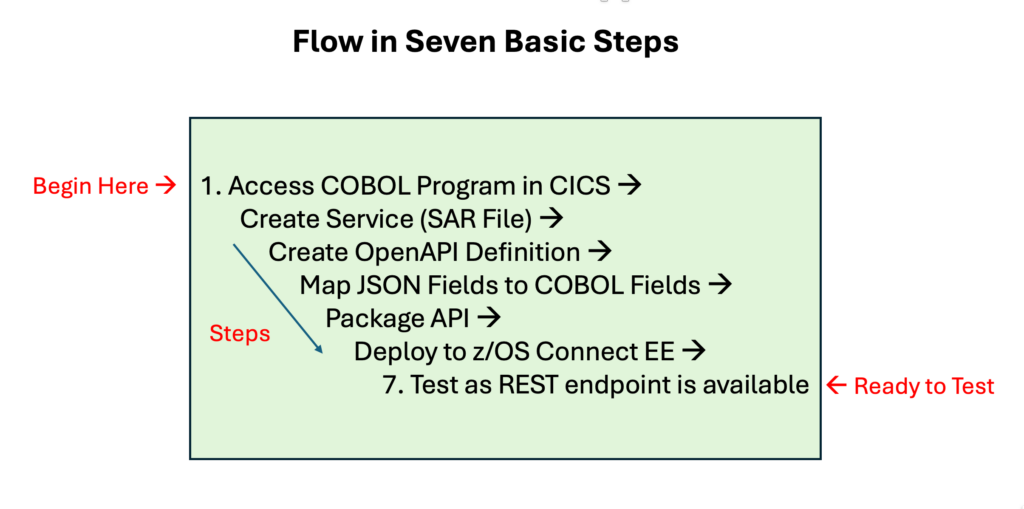
Below is the diagram of the workflow. No new COBOL module is usually generated. The existing COBOL transaction remains in place while z/OS Connect provides the REST/JSON interface.
A Simple Example as a Kind of Recap
Suppose you have a transaction, a program and a layout of the input and output data:
CICS Transaction: INQ1
COBOL Program: CUSTINFO
COMMAREA for Input/Output
Using z/OS Connect you would:
- Get a copy of CUSTINFO and study it to get the details that you need.
- Generate a service definition for the CICS program.
- Create an OpenAPI definition.
- Map JSON fields to the COMMAREA in CUSTINFO.
- Package the API by deploying its API archive.
- Expose an endpoint (see below) to test the functionality of the API.
GET /customers/127643 (search for details about a specific customer using their number)
The mobile app or web application sees REST and JSON, while z/OS Connect translates that into the CICS program call. Remarkable, right?
The Next Tool to Use in the Process is IBM API Connect
After you write and unit test your API, you should use a tool to manage it. I am going to explain using IBM API Connect to manage APIs that run on IBM Z and z/OS. In this section, I will address some questions that you might have, like:
- Where does the software run?
- What supporting products are required?
- Does the product use a supporting DBMS to contain definitions?
- Once I have an API written, how do I get it onto IBM API Connect?
IBM z/OS Connect and IBM API Connect are complementary products. Think of z/OS Connect as the API provider on z/OS and API Connect as the enterprise API management platform.
High-Level Relationship
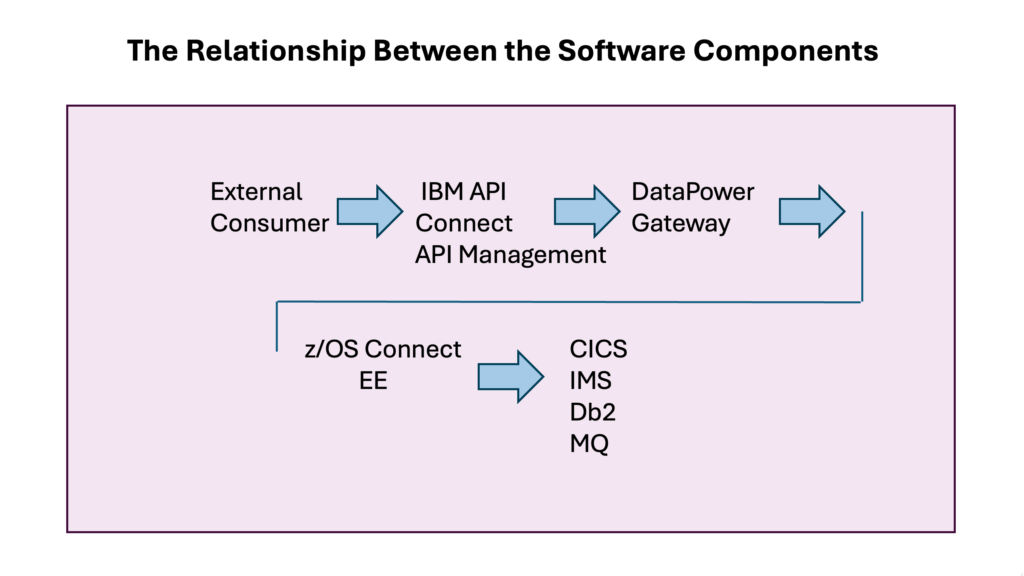
Let’s start with the big picture. The figure below connects the external consumer to the application functionality through the layers of software. In this architecture, z/OS Connect exposes IBM Z program function and data as REST APIs. API Connect publishes, secures, monitors, versions and monetizes those APIs and DataPower Gateway serves as the runtime gateway between consumers and backend services. There is a detailed section on DataPower later in this article.
We Know What z/OS Connect Does—What Does API Connect Add?
By itself, z/OS Connect can expose APIs. However, most enterprises want more than simple API exposure. API Connect supports a Developer Portal, a self-service website where developers can discover, test, subscribe to and learn about APIs. Many other important functions of API Connect are listed below. Think of this as a “top 10” list:
- API Catalog Management – Organizes and manages APIs in catalogs and environments such as development, test and production.
- Product Packaging – Bundles one or more APIs into a product that can be published and consumed by application developers.
- OAuth Security – Provides industry-standard token-based authentication and authorization for APIs.
- JWT Validation – Verifies JSON Web Tokens to ensure API requests come from trusted users or applications.
- Rate Limiting – Controls how many API requests a consumer can make within a specified time-period.
- API Keys – Uses unique keys to identify and authenticate applications consuming APIs.
- Analytics – Tracks API usage, performance, response times, errors and consumer activity through dashboards and reports.
- Version Management – Supports multiple API versions simultaneously and helps manage API lifecycle changes, which is sometimes overlooked in importance.
- Consumer Onboarding – Streamlines the registration and approval process for developers and applications that want to use APIs.
- Subscription Management – Allows consumers to subscribe to API products and enables providers to manage access plans, approvals and usage entitlements.
How Integration Works Between the Two Products
The two products have similar names, so that may be a bit confusing. One helps create APIs (IBM z/OS Connect ) and the other helps manage them (IBM API Connect). Here are six steps that show how integration works:
Step 1: Build the API in z/OS Connect
A developer creates an API in z/OS Connect . For example, a Customer API using a CICS Program CUST001. z/OS Connect generates an OpenAPI (Swagger) Definition.
Step 2: Export OpenAPI Definition
Next, the API description is exported from z/OS Connect as an OpenAPI document with all operations and schemas defined. For example:
/customers/{id}
Step 3: Import Into API Connect
Using API Manager or API Studio, the next step is to import the OpenAPI definition. API Connect now knows important information including paths, methods, parameters, responses and target endpoint. The backend endpoint points to z/OS Connect for API execution.
Step 4: Package as a Product
API Connect groups APIs into products. For example, a customer product with customer API and account API in a useful grouping. It is just a way of organizing things. Also, you might want to create plans, for example, bronze, silver and gold. Each plan can have different rate limits and access policies.
Step 5: Publish
The product is published to a catalog. For example, development, test or production. API Connect propagates the configuration to the gateway.
Step 6: Consumer Calls API
Instead of calling z/OS Connect directly, the client uses an API Connect URL. The request flows through:
Client API Connect DataPower z/OS Connect to CICS/IMS/Db2 …
This lets API Connect govern and secure the interaction.
Security Integration
A very common pattern is:
Client —> OAuth Token —> API Connect —> DataPower validates token —> z/OS Connect to CICS/IMS/Db2 …
API Connect and DataPower Gateway handle modern security technologies such as OAuth 2.0, OpenID Connect and JWT before traffic reaches the mainframe. This reduces the security burden on the z/OS application itself. The topic of security leads us to the last product to focus on in this article.
The Last Tool in the Trio Is IBM DataPower Gateway
IBM DataPower Gateway with API Connect is used to manage APIs that run on IBM Z and z/OS. You might be wondering–is DataPower Gateway a standalone computer? How to I manage security and administer the system itself? What supporting products are required? Does the product use a supporting DBMS to contain definitions? Once I have an API written and managed by IBM API Connect, how do I integrate DataPower Gateway? Let’s get into the details.
Is DataPower Gateway a Standalone Computer?
Historically, DataPower Gateway was available as a physical appliance, which was a dedicated hardware device installed in a data center. Today, most customers deploy DataPower as a virtual appliance, a Docker container, an OpenShift/Kubernetes workload or a cloud-based deployment.
The gateway software is the same regardless of where and how it runs. So the answer is it can be a standalone appliance and it can also run on ordinary Linux servers or OpenShift clusters. Many modern API Connect deployments use containerized DataPower gateways rather than dedicated hardware appliances.
How Is DataPower Administered?
DataPower has several administrative interfaces which are explained below:
1. Web GUI
Most administrators use a web-management interface through a browser. This is used to configure services, create domains, manage certificates, configure networking, install firmware and manage users.
2. CLI
DataPower provides a command line interface (CLI) like network devices and routers. Many organizations automate configuration through scripts and DevOps pipelines.
3. API-Based Administration
Modern deployments commonly use the items below for configuration management:
Table 3. API-Based Administration Approaches
| Tool for API-Based Admin. | What and How? |
| REST management APIs | Programmatic interfaces that allow administrators and automation tools to configure, deploy, monitor and manage system resources using standard HTTP methods such as GET, POST, PUT and DELETE. |
| Automation pipelines | Automated workflows, typically implemented with CI/CD tools, that build, test, validate and deploy application or infrastructure changes with minimal manual intervention. |
| GitOps approaches | An operational model in which Git repositories serve as the authoritative source of truth for system and application configurations, with changes applied through version-controlled commits. |
| OpenShift Operators | Kubernetes-native software extensions that automates the installation, configuration, scaling, updating and lifecycle management of applications and platform services in Red Hat OpenShift. |
How Is Security Managed?
Security is one of DataPower’s primary functions. Common capabilities include transport security, identity management, access control and threat protection. The implementation of the different standards utilizes different innovation approaches, as well as some long-standing conventions as depicted in the figure below.
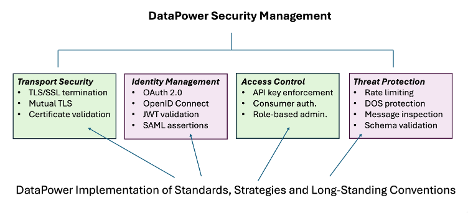
It is useful to note that these controls are typically enforced before any request reaches z/OS.
How Is DataPower Itself Secured?
Administrative security generally includes LDAP, Active Directory, local users and certificate authentication for administrator access to DataPower. Organizations often integrate DataPower with enterprise identity management systems so that administrators do not need local accounts. This makes centralized audit and access control possible.
What Supporting Products Are Required for DataPower?
Technically, DataPower can operate by itself. A simple deployment may look like:
Client —> DataPower —> Backend Server
API Connect is not required; however, enterprise IBM Z environments often use API Connect with z/OS Connect. Additional common products include IBM MQ, CICS TS, IMS, Db2 for z/OS, RACF and LDAP/Active Directory depending on the applications being exposed.
Does DataPower Use a DBMS?
Most configuration are stored internally as configuration objects and files rather than in a traditional relational database. The DataPower instance maintains security definitions, policies, certificates, routing rules and service definitions inside its own configuration repository. For analytics and API product management, IBM API Connect provides the broader platform services. DataPower primarily focuses on runtime execution and policy enforcement.
How Does DataPower Integrate With API Connect?
API Connect treats DataPower as its gateway runtime. Consider these steps:
Step 1: Create API
Suppose you create:
GET /customer/{id}
The API may access CICS, IMS, MQ, and Db2 through z/OS Connect .
Step 2: Import Into API Connect
Import the OpenAPI definition and configure the 4 items below in API Connect.
- Security Policies – define how an API is protected and who can access it.
- Rate Limits – Control how many API calls can be made during a specified time period.
- Products – A business package of APIs that is published to developers.
- Plans – Defines the usage rules for a Product.
Step 3: Associate Gateway
Within API Connect, you register one or more DataPower gateways as managed gateways. API Connect then knows where the APIs will execute.
Step 4: Publish Product
When you publish the API, Product and Catalog, API Connect automatically pushes runtime configuration to DataPower.
Step 5: Runtime Processing
At runtime, the flow is as follows:
Consumer —> DataPower —> z/OS Connect —> CICS Program
DataPower performs authentication, authorization, JWT validation, rate limiting, audit logging and protocol mediation before forwarding the request.
Final Thoughts and Recommendations
For the sort of hybrid IBM Z architecture I have been exploring, you should utilize the products in the table below. This separation of responsibilities allows you to keep business applications and data on IBM Z while exposing them as secure, managed, cloud-style APIs for enterprise and mobile consumers.
Table 4. Products for a Hybrid Environment—A Recap
| Component | Responsibility |
| Security Server (RACF) | Mainframe authentication and authorization |
| CICS / IMS / Db2 | Business logic and data |
| z/OS Connect | REST API exposure of z/OS assets |
| DataPower Gateway | Security, mediation, routing and policy enforcement |
| API Connect | API governance, portal, analytics and lifecycle management |
Next Article in the Series
In the next article in this series, I will explore middleware and transaction management. That includes a discussion of CICS, IMS, DB2 and MQ in hybrid environments.