How PR/SM, z/VM and KVM Became Virtualization Superstars on IBM Z
For the second installment of his series, "The IBM Z Experience," Joe Gulla traces the evolution of virtualization—from address-space isolation to modern, full-system hypervisors

Virtualization on System Z: PR/SM, z/VM and KVM
Just about everyone who writes about virtualization on System Z, discusses Processor Resource/System Manager (PR/SM), System Z Virtual Machine (z/VM) and Kernal-Based Virtual Machine (KVM). These hypervisors certainly are virtualization superstars. However, before that feature and software was created, virtualization was developed and deployed at the address space level. IBM made it possible for address spaces to be virtual by providing Dynamic Address Translation (DAT) and background support with paging and swap datasets.
A Magic Trick Made Possible Through Innovation
Virtualization at the address space level always seemed like a magic trick to me. However, I knew the valuable function was made possible by DAT, as well as the increased speed of CPUs which had more cycles available to provide services. Also, the improved density and speed of auxiliary storage delices was a big help. It was only a matter of time, moved along by many contributing projects, that virtualization became one of the most useful features in all of computing and moved from address spaces to entire systems.
Where it All Started
Long before names like PR/SM, z/VM, or KVM became synonymous with virtualization on IBM Z, IBM introduced the first practical steps of virtualization at the address space level. Beginning with System/360 Model 67 and maturing in MVS, the hardware-supported Dynamic Address Translation mechanism decoupled a program’s logical addresses from real memory, allowing each address space to behave as if it owned a large, contiguous memory image. This was liberating for programmers who previously were stuck making sure that their code fit in a small chunk of memory.
Additionally, paging and swap datasets provided the backing storehouse that made this illusion usable at scale. These datasets supported moving pages between central storage and disk in a transparent manner. This approach did not virtualize entire machines, but it virtualized execution contexts for programmers enabling strong isolation, meaning that you could not accidently step on the other programmer’s application. It also made use of multiprogramming capabilities which were needed to make virtualization of address spaces practical.
The Foundation for Full-Machine Virtualization
These early design choices established the conceptual foundation for later full-machine virtualization including clearly defined boundaries, hardware-enforced translation and separation of logical intent from physical resources. These principles continue to define System Z virtualization today.
Freeing The Programmer to Meet Enterprise Needs
DAT is the hardware and architecture mechanism that allows a program to run as if it owns a large, private, contiguous memory space while the system transparently maps that illusion onto the physical storage that is available. In IBM mainframe architectures, DAT sits squarely between the CPU and real storage and is enforced in hardware, making it both fast and secure.
At execution time, a program issues instructions using virtual addresses (also called logical addresses). With DAT, those addresses are not used directly to access real memory. Instead, the CPU consults a set of translation tables, pointed to by control registers, to determine how a virtual address maps to a real address. This translation happens on every storage reference, without the program being aware of it.
Each address space has its own translation context, which is why multiple programs can use the same virtual address without conflict. It is interesting that researchers thought this might be a way to improve the overall computing experience and engineers and programmers devised a working solution after a number of approaches and attempts.
The translation itself is hierarchical. A virtual address is divided into fields that index into a series of tables. Segment tables and page tables were used in earlier architectures and region tables came later with z/Architecture. These tables ultimately resolve the address to a real page frame number plus an offset within the page. If the required page is currently resident in central storage, the access proceeds immediately. If it is not resident, a page fault occurs, transferring control to the OS.
Dealing With a Page Fault
When a page fault happens, the OS uses the DAT tables to determine where the missing page resides on disk—typically in a paging or swap dataset. The OS selects a real page frame, possibly writing another page out to disk if memory is full, reads the needed page into central storage, updates the translation tables and resumes execution of the faulting program. To the program, this delay is invisible; it still behaves as though all memory were always present. Still reads like a magic trick, right?
Crucially, DAT also enforces protection and isolation. The translation tables include control bits that specify whether a page can be read, written or executed, and whether it can be shared. Because the hardware checks these bits on every reference, one address space cannot corrupt another, and user programs cannot access OS storage unless explicitly permitted. This made secure multiprogramming practical at scale.
In the historical context, DAT was revolutionary because it virtualized execution contexts long before entire machines were virtualized. Address spaces, paging and backing storage created the illusion of abundant memory, enabled hundreds or thousands of concurrent workloads and established the core principles later used by full-machine virtualization.
The core principles include indirection, hardware enforcement and separation of logical resources from physical reality. In many ways, PR/SM and z/VM extend DAT’s ideas upward, from virtual memory to virtual CPUs and virtual machines without changing the fundamental model. Even though I have a good understanding of address-space virtualization, it still fills me with wonder just thinking about it.
Let’s Get Into PR/SM z/VM and KVM Details
To start with, how are PR/SM, z/VM and KVM different? Is there a hierarchy—for example, is one built upon the other? Are they different technologies or are they basically the same? Are they products or software features? Are any of them hardware features?
PR/SM, z/VM and KVM on IBM Z are often misunderstood because they all involve virtualization, but at different layers, for different purposes and with different histories.
How PR/SM, z/VM and KVM Differ
On IBM System Z, PR/SM is the firmware‑based, hardware virtualization layer that creates logical partitions (LPARs). z/VM is a Type‑1 hypervisor that runs inside an LPAR and specializes in large‑scale virtualization of Linux and z/OS guests with deep mainframe integration. KVM on IBM Z is also a Type‑1 hypervisor, but oriented toward cloud‑native and open‑source ecosystems, using standard Linux/KVM tooling. They are distinct technologies, not replacements for each other, and they form a clear hierarchy, with PR/SM at the foundation.
The Virtualization Hierarchy
In short, there is a hierarchy, and understanding it clarifies everything else.
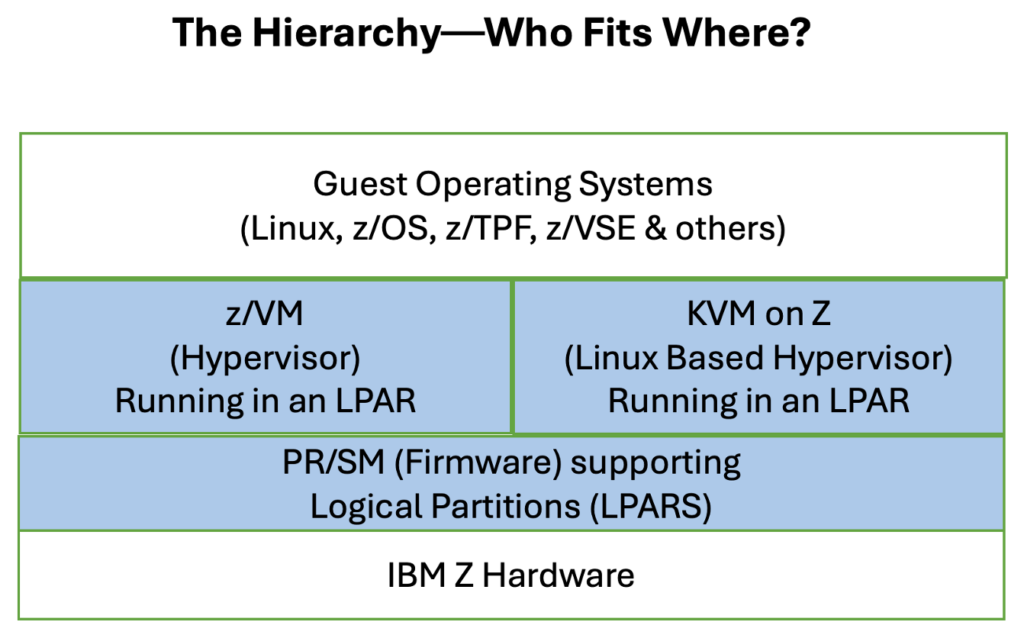
PR/SM is the root of the virtualization tree. Nothing runs on an IBM Z system without PR/SM. z/VM and KVM never sit directly on bare metal as they run inside an LPAR supported by PR/SM. Typically, enterprises choose either z/VM or KVM per LPAR, not both together.
PR/SM: The Foundation Layer
PR/SM is firmware/microcode embedded in the hardware. It is IBM Z’s equivalent to a hardware hypervisor. It creates and supports LPARs, which are physically isolated environments.
What Are its Architecture Characteristics?
First, it virtualizes CPUs (IFL, CP and zIIP are specialty processors), memory and I/O channels. It enforces hard isolation so that one LPAR cannot see another’s memory or devices. Additionally, it directly integrated with channel subsystems and I/O virtualization.
Is PR/SM a Product?
No, it is not a separate product but rather a feature of IBM Z hardware that is licensed implicitly with the machine. It provides strong isolation for production versus test, different security zones and mixed workloads like z/OS and Linux. It could be used to establish regulatory and compliance boundaries or to support performance‑sensitive or latency‑critical workloads.
What About its Performance?
PR/SM provides near‑native performance with very low overhead and predictable latency. You can frame PR/SM as “hardware-enforced virtualization” as it is not software virtualization.
z/VM: Mainframe-Native Hypervisor
z/VM, a Type 1 hypervisor, is software running in an LPAR designed specifically for IBM Z. Historically, z/VM descends from CP 67 and VM/370, which was the original virtualization platform.
Is z/VM a Product?
Yes, it is licensed IBM software that is installed like an OS. As with other products, it is versioned, patched and supported. z/VM can be used to create thousands of virtual machines known as guests. It employs an extremely efficient CPU overcommit and includes advanced memory management including page sharing and overcommit with predictable performance. It also has deep integration with channel I/O, z/Architecture instructions and z/VM networking (VSwitch).
What Guests Does z/VM Support?
z/VM supports Linux on IBM Z (64-bit distributions), z/OS V2.1 and above, z/TPF V1.1 and z/VM itself (used for nested virtualization testing). Also supported is 21CS VSEn 6.3+, which refers to a mainframe OS line (VSEn) developed and supported by 21st Century Software (21CS), with version 6.3 or later (the “+” indicating 6.3 and newer releases).
How Is z/VM Used?
z/VM is used to provide massive Linux consolidation, from hundreds to thousands of guests. It enables mixed workload density and supports long‑running enterprise workloads, providing stable, predictable operational environments. It also supports tight integration with traditional mainframe tooling.
Many z/VM users make extensive use of the z/VM tools launched from the Conversational Monitor System (CMS). CMS is not a shell in the Unix sense, as it is closer to a command‑driven single‑user OS running inside each virtual machine. Internally, IBM created many applications that helped streamline the development process under CMS, from maintaining software inventory to creating and editing the books that went with a large variety of IBM products. Restructured Extended Executor (REXX) is the primary scripting and command language for CMS. It is used for automation, system administration and general-purpose programming.
What Is z/VM’s Performance Profile?
The performance of z/VM is characterized by outstanding overcommit efficiency, excellent I/O virtualization and slightly higher overhead than PR/SM alone—but optimized for scale. A way to think of the relationship between PR/SM and z/VM is that PR/SM provides isolation while z/VM supplies the opportunity for density.
KVM on IBM Z: Open, Cloud‑Aligned Virtualization
KVM on IBM Z is the Linux KVM hypervisor running inside a Linux LPAR defined by PR/SM. Architecturally, it is like KVM on x86 and Power systems.
Is KVM a Product?
No, it is a standalone IBM hypervisor that comes as a feature of Linux distributions. Those specialized for System Z include Red Hat Enterprise Linux (RHEL), SUSE Linux Enterprise Server (SLES) and Ubuntu (on Z).
What Guests Does KVM Support?
KVM on IBM Z runs 64‑bit Linux (s390x) guests that are officially supported by their suppliers on IBM Z hardware. Here is more detail on the supported guest versions by supplier.
Red Hat Enterprise Linux (RHEL) for IBM Z
Supported guest versions include RHEL 8.x and RHEL 9.x. Both are distributions available from Red Hat, an IBM company. These releases are fully supported by Red Hat and IBM when running on KVM in a dedicated LPAR.
SUSE Linux Enterprise Server (SLES) for IBM Z
Supported guest versions provided by SUSE S.A. include SLES 15 (SP4, SP5, SP6, SP7 as current generation). SUSE Linux is fully supported on IBM Z and LinuxONE. KVM supported on z14 and later hardware which includes z17.
Ubuntu Server for IBM Z
Supported guest versions from Ubuntu include Ubuntu 20.04 LTS, Ubuntu 22.04 LTS and Ubuntu 24.04 LTS. Ubuntu is supported as a KVM guest as well as z/VM guest. It is commonly used for cloud‑native and OpenStack/MAAS deployments. Here are details about Ubuntu with OpenStack implementations deployed using MAAS.
How is it Used?
KVM integrates naturally with OpenStack, Kubernetes, cloud-native tooling and Ansible/ Terraform products. It supports cloud‑native platforms on Z and supplies hybrid cloud consistency with x86. It is handy for development and test systems and works well with open-source ecosystems and modern continuous integration/continuous development pipelines.
What is its Performance Profile?
Generally, KVM has very good performance. It is slightly less optimized for extreme density than z/VM but it has better ecosystem alignment than z/VM.
About KVM on IBM Z Running 64-bit Linux Guests
As has been discussed, KVM on IBM Z runs 64-bit Linux (s390x) guests that are officially supported by their vendors on IBM Z hardware. Depending on your knowledge of Linux, you might be wondering—when a Linux guest is running, does it support many applications at the same time or is the Linux image dedicated to one application? Also, is that guest a multi-user systems or just one user at a time?
A Linux guest on KVM on IBM Z is a full, normal Linux system. It can run many applications at the same time and is fully multi‑user, unless you deliberately configure it otherwise. In summary:
Table 1. Linux Guest on KVM Summary
| Key Questions | Yes/No Answer |
| Can it run many apps at once? | Yes |
| Is it multi-user? | Yes |
| Functionally the same as Linux on x86? | Yes |
| Single application only? | No, unless you choose to configure it that way |
They Are Not the Same Technology
In this article, I have explained that the virtualization software discussed in this article is different from one another. They operate differently and are native by history to different software ecosystems. Table 2 gives you a summary view of this.
Table 2. Different Layers with Different Purposes
| PR/SM | z/VM | KVM on Z | |
| Layer? | Firmware | Hypervisor OS | Linux feature |
| Runs on? | Hardware | LPAR | Linux LPAR |
| Type? | Hardware HV | Type‑1 | Type‑1 |
| Isolation? | Hard | Soft (enforced by PR/SM) | Soft |
| Guest scale? | Dozens | Thousands | Hundreds |
| Specific Guests? | N/A | – Linux on IBM Z (64-bit distributions)- z/OS V2.1 and above- z/TPF V1.1- 21CS VSEn 6.3+- z/VM itself (nested for testing) | – Red Hat Enterprise Linux (RHEL) for IBM Z- SUSE Linux Enterprise Server (SLES) for IBM Z- Ubuntu Server for IBM Z |
| Orientation? | Infrastructure | Enterprise density | Cloud-native |
Virtualization in Different Contexts
Today, virtualization is available in different contexts on other computers in addition to IBM Z. This includes other enterprise servers in data centers (x86-64 servers, IBM Power Systems and Oracle SPARC servers), desktop computers and laptops (Windows PCs, macOS computers and Linux workstations) and edge and specialized computing (embedded devices and hyperconverged infrastructure).
Common virtualization software/platforms that enable the virtualization on the hardware mentioned above include those in the table below:
Table 3. Virtualization Software Used in Various Hardware Platforms
| Software | Description of Use |
| Kernel-based Virtual Machine (KVM) | Linux-native, widely used in cloud computing like AWS and OpenStack |
| VMware ESXi/vSphere | Industry leader for enterprise server virtualization |
| Microsoft Hyper-V | Standard on Windows Server for enterprise environments |
| Proxmox VE | Open-source platform combining KVM VMs and LXC containers |
| Xen | Open-source used in cloud infrastructures |
| Docker/Containers | OS-level virtualization sharing the host kernel |
The next article in the series will cover how these virtualization foundations enable Linux on Z with enterprise-grade open source. I’ll write about the benefits, adoption trends and integration with z/OS.