hmcScanner: Evolution of a Classic IBM Power Tool

For more than two decades, the free hmcScanner tool has been a trusted utility in the toolkit of IBM Power administrators. From Power5 through Power10, it has quietly supported teams in gathering Power system inventory, validating configurations and planning migrations. Its longevity is a testament to its simplicity, reliability and script-friendly design—features that have made it indispensable in day-to-day operations across AIX, IBM i and VIOS environments.
Observations From 2025 and 2026
While reviewing the latest updates for the tool, I noticed some interesting messages on the official site that caught my attention. These messages reflect both the evolution of the IBM Power platform and the ongoing updates to the hmcScanner tool.
Early 2025: HMC v11
“WARNING: if you are using HMC v11 this scanner will not work. Please use the alternative hmcScanner project available on DockerHub:
[https://hub.docker.com/r/fvagnini/hmcscanner”](https://hub.docker.com/r/fvagnini/hmcscanner”)
Later 2026: POWER11 systems
"NOTE: POWER11 introduces Resource Groups. They are not included in the report. For a more complete report use the hmcScanner python project: [https://hub.docker.com/r/fvagnini/hmcscanner”](https://hub.docker.com/r/fvagnini/hmcscanner”)"
“Update 56 of version 0.11 - Required for POWER11 systems"
These notices made it clear that the classic hmcScanner continues to function with the newer HMC v11 code and Power11 systems, with one exception: Power11 Resource Groups are not included in the report. So, if you need full reporting for Power11 Resource Groups, the Docker-based Python project is a must. A Power11 resource group is a collection of cores that are isolated from the other cores in the system. For more information see the references section at the end of this article.
Testing the Docker-based hmcScanner
Curious to explore the modern Python-based approach, I decided to test the Docker version on a RHEL 9.2 LPAR, running on IBM Power of course. Before running the tool, I made sure that podman was installed. If podman isn’t installed on your RHEL system you should be able to install it with dnf -y install podman.
[root@lx92 ~]# rpm -q podman
podman-4.4.1-3.el9.ppc64le
[root@lx92 ~]# podman version
Client:       Podman Engine
Version:      4.4.1
API Version:  4.4.1
Go Version:   go1.19.4
Built:        Tue Feb 21 06:18:24 2023
OS/Arch:      linux/ppc64le
Next, I prepared the environment for the scanner by creating a setup.txt file in my current working directory (/root), containing the HMC connection details and report output paths. The file looked like this:
HMC=10.1.12.241
USER=hscroot
PASSWORD=mypass234!
DATADIR=/data
EXCEL=/data/excel.xlsx
I then created the necessary data directory (datadir) in my current directory and ensured it had the appropriate permissions so that the docker container could write the output files:
[root@lx92 ~]# mkdir datadir
[root@lx92 ~]# chmod 777 datadir
[root@lx92 ~]# ls -ltr
total 20
-rw-r--r--. 1 root root   84 Feb 17 19:12 setup.txt
drwxrwxrwx. 7 root root 4096 Feb 17 19:56 datadir
With the environment prepared, I ran the Docker-based scanner with podman run –rm –pull=always -v ./datadir:/data:z –env-file setup.txt fvagnini/hmcscanner:latest; see example output below.
[root@lx92 ~]# podman run --rm --pull=always -v ./datadir:/data:z --env-file setup.txt fvagnini/hmcscanner:latest
Trying to pull docker.io/fvagnini/hmcscanner:latest...
Getting image source signatures
Copying blob 9ca04b9002b3 done
Copying blob d71a5729cf9f done
Copying blob 526cdb65c84a done
Copying blob b119d4efc3c0 done
Copying blob 38798fa0998c done
Copying blob eead2c4a2afd done
Copying blob 139eef15b087 done
Copying blob 5bf9d934634e done
Copying blob 9c9f179b3b33 done
Copying blob 30af400eda55 done
Copying config d93eb54697 done
Writing manifest to image destination
Storing signatures
hmcScanner 0.5 has started...
Scanning HMC configuration: OK
Scanning 5 Managed Systems with 5 processes:
  5/5   | 100% | *** SCANNING PROGRESS ***     :  ██████████
  0/0   |   0% | -- empty --                   :
  0/0   |   0% | -- empty --                   :
  0/0   |   0% | -- empty --                   :
  0/0   |   0% | -- empty --                   :
  0/0   |   0% | -- empty --                   :
Managed System data download completed
Creating report
.............................................
Scan completed: /data/excel.xlsx
[root@lx92 ~]#
The scan completed successfully, generating the excel.xlsx report in the datadir directory.
[root@lx92 ~]# ls -l datadir/excel.xlsx
-rw-r--r--. 1 cloud-user cloud-user 122376 Feb 17 21:16 datadir/excel.xlsx
I was able to transfer this report to my workstation and open it in MS Excel, just like the classic scanner output. In the new release of the tool the spreadsheet contains new managed system sheets, named Resource Group and Processor Pools, that provide basic information for RGs and shared processor pools settings. Viewing the LPAR CPU&RAM sheet shows you the resource group and the pool size for each LPAR. Refer to the screenshots below.
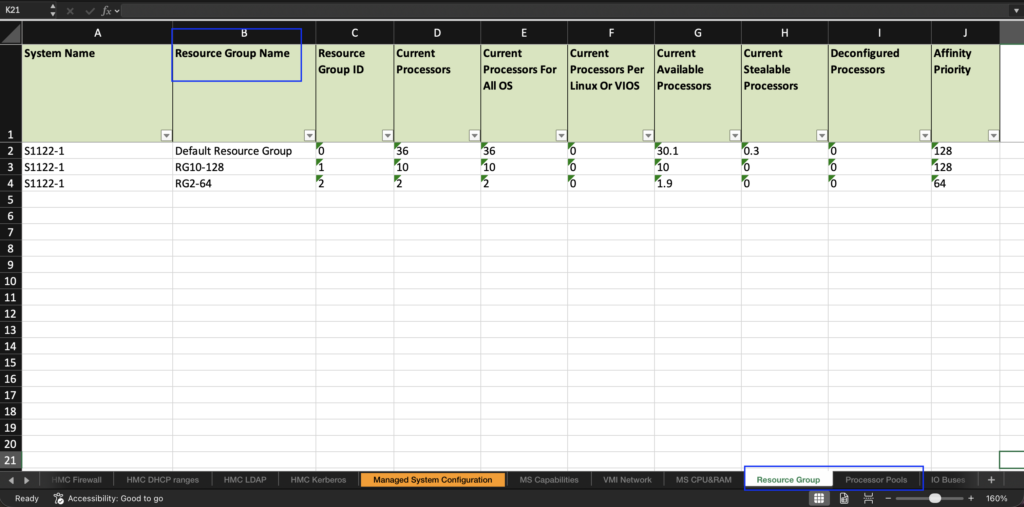
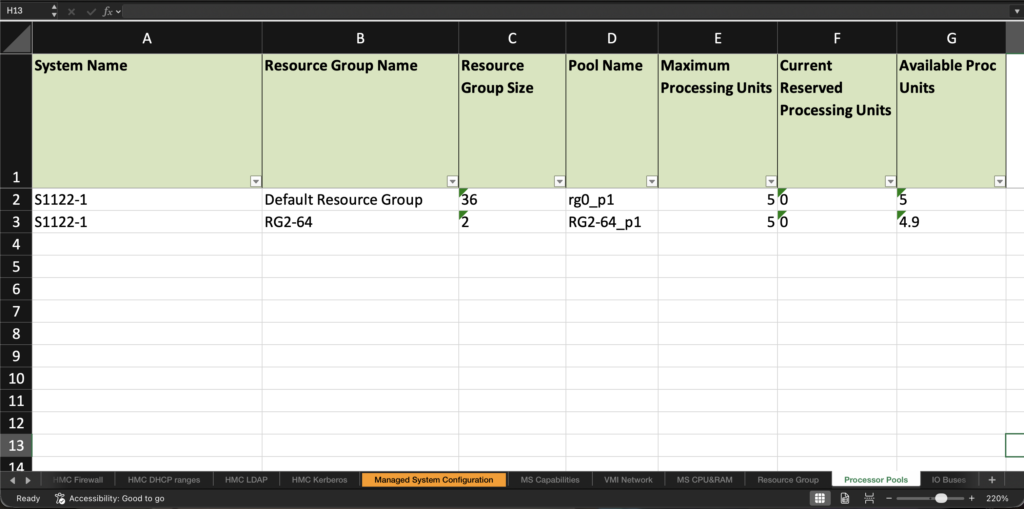
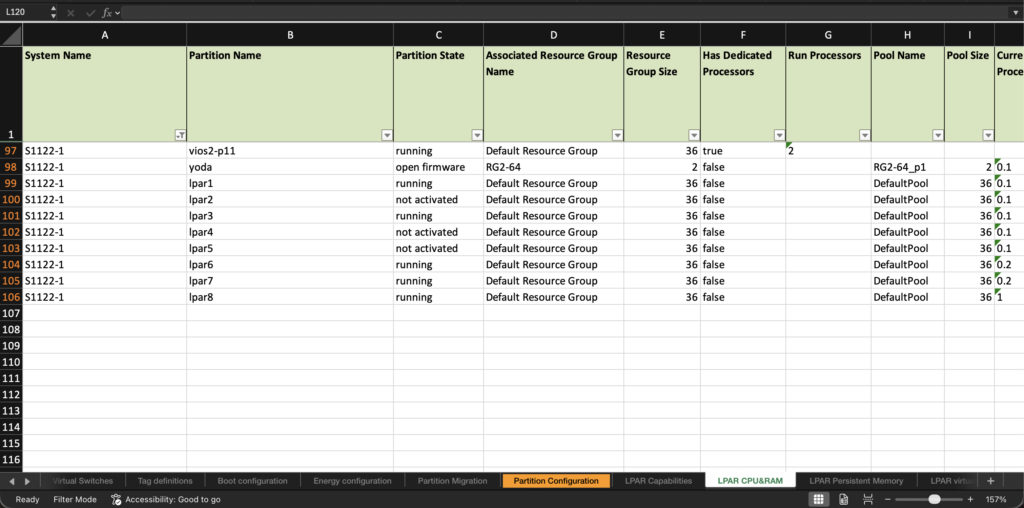
The Docker image itself was stored locally, but I noted that the tools author recommends using the –pull=always option with podman to be sure to have latest code (otherwise you will use your locally cached version).

This image supports both amd64 (Intel/AMD 64-bit) and ppc64le (IBM Power 64-bit Little Endian) architectures, but only for Linux.
[root@lx92 ~]# podman manifest inspect docker.io/fvagnini/hmcscanner | jq '.manifests[].platform'
{
  "architecture": "amd64",
  "os": "linux"
}
{
  "architecture": "ppc64le",
  "os": "linux"
}
Still a Reliable Tool
Even after more than 20 years, hmcScanner remains a reliable and essential tool for IBM Power administrators. The classic version continues to be compatible with newer HMC and Power releases—HMC v11 and Power11 systems—so you can still run this version of the tool today, if you wish. And it still runs on any OS that supports Java 1.8, including AIX, Linux and Windows. The Docker/Python version adds full support for Power11 Resource Group reporting, ensuring the tool remains relevant in today’s IBM Power environments.
If you’re a longtime user of the hmcScanner (and who isn’t?!) and you’re soon to install some shiny new Power11 servers, consider moving to the new docker version of the tool. Then you’ll be ready to generate reports that include resource group details. To learn more, please be sure to review the references listed below.
References
HMC Scanner for POWER Server Config and Performance Stats
hmcScanner python project: fvagnini/hmcscanner
hmcScanner & pGraph
Power11 Resource Groups