Taking Greater Control of Live Partition Mobility
Using the vfc resource label as an example, Chris Gibson provides a practical introduction to VIOS group labels

When performing Live Partition Mobility (LPM) operations, multiple Virtual I/O Server (VIOS) pairs may be available, and the default Hardware Management Console (HMC) selection may not always align with intended design or policy of your Power server landscape. By default, the HMC automatically chooses valid VIOS combinations to maintain redundancy, but this selection can be unpredictable. Many Power administrators want predictability and control over where a Logical Partition (LPAR) lands during LPM; that is, they want to select the target VIOS for their LPAR.
One way to address this is to define VIOS group storage labels across systems so that matching labels guide the HMC in selecting the appropriate target VIOS and maintaining consistent storage adapter mappings. These labels also provide override controls that allow administrators to enforce strict label matching or allow fallback options when required. This improves consistency, reduces manual intervention and provides more predictable and reliable LPM outcomes.
One of the primary objectives of VIOS group labels is to allow administrators to assign a group label to each VIOS partition across multiple managed systems. During an LPM operation, the HMC uses these group labels when selecting target VIOS partitions. Specifically, the HMC attempts to map the migrating partition’s virtual storage adapters to target VIOS partitions that have the same group label as the source hosting VIOS partitions. By using VIOS group labels, administrators can preserve a consistent and desired virtual storage adapter mapping pattern after migration, while minimizing manual intervention.
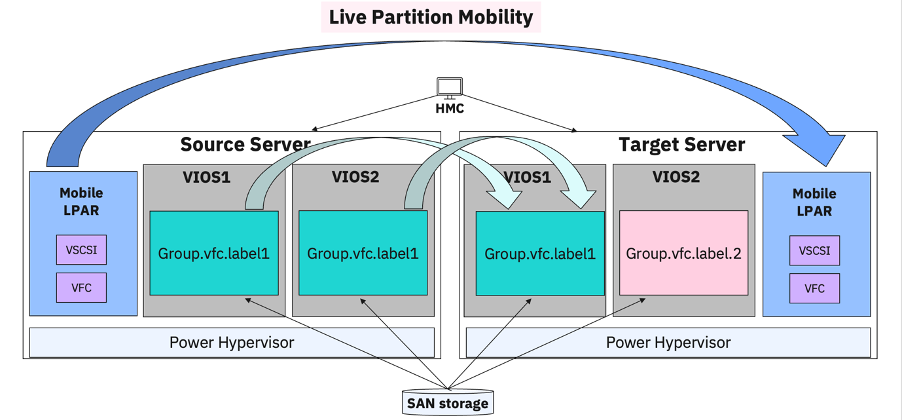
The diagram below shows VIOS configured with VIOS group storage labels for Virtual Fiber Channel (VFC). In this example the mobile partition will use VIOS1 as the destination for its virtual FC adapters; as the VIOS group label on the target VIOS matches the label on the source system (Group.vfc.label1).
In this article we’ll provide a practical example of how to apply VIOS group storage labels and observe the impact on LPM operations.
Our Lab Environment
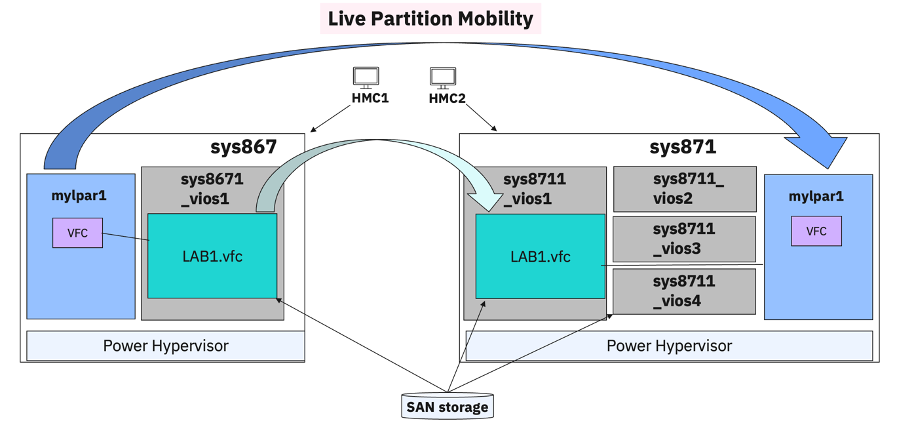
Our example lab environment consists of two Power servers; one server is named sys867, and is considered our primary managed system, which is where our mobile partition (LPAR named mylpar1) currently resides. The other server is named sys871. We will live migrate our LPAR, mylpar1, from sys867 to sys871. The Power servers are managed by different HMCs; that is, sys867 is managed by an HMC named hmc1, while sys871 is managed by hmc2. We are using HMC version 10, release 3, service pack 1062 in this scenario.
The LPAR utilizes a single VFC adapter through one VIOS named sys8671_vios1 on the source system. On the destination system, there are four VIOS named sys8711_vios1, sys8711_vios2, sys8711_vios3 and sys8711_vios4 (all of which have access to the same SAN storage as the VIOS on sys867). Our intent is to ensure that, when the LPAR is migrated to the target server, the VFC adapter is mapped to the VIOS named sys8711_vios1 only; we don’t want the VFC adapter mapped through any of the other three possible VIOSes on the target. We can use VIOS group storage labels to achieve this goal.
The diagram below provides a pictorial view of the test environment we used.
Listing Virtual I/O adapter mapping options
We start by displaying the virtual I/O adapter mapping options that are possible for our LPAR. We pay close attention to the possible_virtual_fc_mappings and suggested_virtual_fc_mappings output. We run the lslparmigr command from the primary HMC (hmc1) and review the output.
hscroot@hmc1:~> lslparmigr -r virtualio -m sys867 -t sys871 --filter "lpar_names=mylpar1" --ip 10.1.12.200 -u hscroot
"available_vios_virtual_slots=sys8711_vios1/11/3-255,sys8711_vios3/13/2-
255",possible_virtual_scsi_mappings=none,suggested_virtual_scsi_
mappings=none,"possible_virtual_fc_mappings=5/sys8711_vios1/11,5
/sys8711_vios3/13",suggested_virtual_fc_mappings=5/sys8711_vios3
/13/3,possible_vnic_mappings=none,suggested_vnic_mappings=none
Note that in this example the possible_virtual_fc_mappings output provides more than one potential VIOS for mapping, that is, sys8711_vios1 and sys8711_vios3. We only want sys8711_vios1. You can filter the output further if you wish using the -F option to show only the possible VFC mappings.
hscroot@hmc1:~> lslparmigr -r virtualio -m sys867 -t sys871 --filter "lpar_names=mylpar1" --ip 10.1.12.200 -u hscroot -F possible_virtual_fc_mappings
"5/sys8711_vios1/11,5/sys8711_vios3/13"
Note that in the lslparmigr examples above we specify the IP address of the remote HMC, 10.1.12.200. This is the IP address of hmc2, which manages the sys871 server. We have already configured remote SSH access between hmc1 and hmc2 for the hscroot root user. Refer to Verifying SSH authentication between the source and destination HMC on the IBM documentation site for more details. If your Power servers are all managed by the same HMC then this approach is not required.
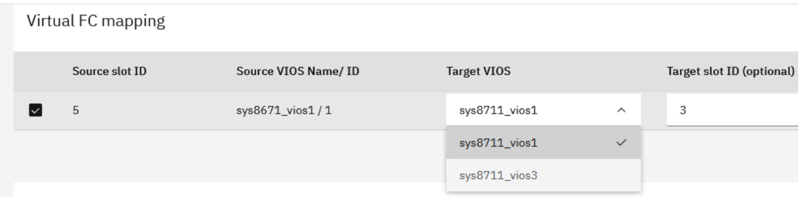
We can also do the same from the HMC UI. Using the LPM wizard, in the Edit Migration Settings panel, we can view the potential storage mapping, in this case the Virtual FC mapping. In the example screenshot below we can see that our source VIOS is sys8671_vios1 and there are two potential target VIOS that could map the LPARs VFC adapter.
Creating a VIOS Group Label
Using the labelvios command, from the primary HMC, we create a new VIOS group storage label for the primary managed system, sys867. We assign a group label name of LAB1. We specify a group resource type of vfc (for virtual FC mapping) and specify the name of the primary VIOS that our LPAR is currently mapped to; that is, sys8671_vios1.
hscroot@hmc1:~> labelvios -m sys867 -o a -l LAB1.vfc -i "resource=vfc,\"vios_names=sys8671_vios1\""
We can list the available VIOS group labels on the primary HMC for the primary system using the lslabelvios command.
hscroot@hmc1:~> lslabelvios -m sys867 -r group
name=LAB1.vfc,resource=vfc,type=include,vios=sys8671_vios1/11
From the secondary HMC, hmc2, we now create the same VIOS group label (LAB1) for the secondary managed system (sys871). Again, we specify a group resource type of vfc and specify the name of the desired secondary VIOS; that is, sys8711_vios1. Then we list the newly created label information.
hscroot@hmc2:~> labelvios -m sys871 -o a -l LAB1.vfc -i "resource=vfc,\"vios_names=sys8711_vios1\""
hscroot@hmc2:~> lslabelvios -m sys871 -r group
name=LAB1.vfc,resource=vfc,type=include,vios=sys8711_vios1/11
Now that the labels have been created on both systems, from the primary HMC (hmc1), we again display the virtual I/O adapter mapping options that are possible for our LPAR, mylpar1.
hscroot@hmc1:~> lslparmigr -r virtualio -m sys867 -t sys871 --filter "lpar_names=mylpar" --viosstoragelabel 1 --ip 10.1.12.200 -u hscroot
available_vios_virtual_slots=sys8711_vios1/11/3-255,possible_virtual_scsi_mappings=none,suggested_virtual_scsi_
mappings=none,possible_virtual_fc_mappings=5/sys8711_vios1/11,
5/sys8711_vios3/13",suggested_virtual_fc_mappings=5/sys8711_vios3/
13/3,possible_vnic_mappings=none,suggested_vnic_mappings=none
Observe that this time we included a new flag, –viosstoragelabel 1. We use this option to specify whether VIOS virtual FC (and virtual SCSI) group labels are to be used when determining mappings of virtual FC (and virtual SCSI) adapters. Valid values are 1 if VIOS virtual FC (and virtual SCSI) group labels are required to be used, or 2 if VIOS virtual FC (and virtual SCSI) group labels are to be used if possible. If this option is not specified, it defaults to the value of the VIOS storage group label override option for the managed system, which is 2 (use if possible). You can display the label override defaults for a system with the lslabelvios command.
hscroot@hmc1:~> lslabelvios -m sys867 -r default
storage_label_override=2,msp_label_override=2,fc_port_label_
override=2,vnic_label_override=2
Note that the possible_virtual_fc_mappings output now provides only one possible VIOS for mapping (which is our desired target VIOS, sys8711_vios1). You can filter the output further if you wish, using the -F option to show only the possible VFC mappings.
hscroot@hmc1:~> lslparmigr -r virtualio -m sys867 -t sys871 --filter "lpar_names=mylpar1" --ip 10.1.12.200 -u hscroot -F possible_virtual_fc_mappings
5/sys8711_vios1/11
LPM With Labels Applied
Now we will migrate our LPAR to the secondary system and observe the impact of the VIOS labels. From the primary HMC we run the migrlpar command to migrate mylpar1 from sys867 to sys871.
hscroot@hmc1:~> migrlpar -o m -m sys867 -t sys871 --ip 10.1.12.200 -u hscroot -p mylpar1
Once the migration is complete, we can confirm that the LPARs VFC adapter is now mapped to the desired secondary VIOS, sys8711_vios1. We run the vfcstat command from the AIX LPAR (mylpar1) to view the VIOS partition name for the VFC adapter.
{sys8671_lpar1} / # vfcstat -d fcs0 -f hostinfo
VFC client adapter name                   : fcs0
Host partition name  (VIOS)               : sys8711_vios1
VFC host adapter name                     : vfchost0
VFC host adapter location code            : U8284.22A.060F4ER-V11-C3
FC adapter name on VIOS                   : fcs0
FC adapter location code  on VIOS         : U78CB.001.WZS0J07-P1-C7-T1
Now we migrate the LPAR back to the primary system. We use migrlpar again, this time specifying the IP address of hmc1, which manages sys67.
hscroot@hmc1:~> migrlpar -o m -m sys871 -t sys867 --ip 10.1.12.100 -u hscroot -p mylpar1
Again, we confirm the LPARs VFC adapter is now mapped to the desired primary VIOS (sys8671_vios1) after the migration.
{sys8671_lpar1} / # vfcstat -d fcs0 -f hostinfo
VFC client adapter name                   : fcs0
Host partition name  (VIOS)               : sys8671_vios1
VFC host adapter name                     : vfchost0
VFC host adapter location code            : U8284.22A.21C194V-V11-C3
FC adapter name on VIOS                   : fcs0
FC adapter location code  on VIOS         : U78CB.001.WZS06R4-P1-C7-T1
Note how the migration now automatically selects the desired VIOS each time (in both directions), without any manual intervention. The VIOS group (storage) labels provide this level of control.
Conclusion
We hope you found this simple and brief practical introduction and example to VIOS group labels useful, and that you can now see how they could be applied when migrating LPARs between Power servers, giving you greater control of where LPARs land and are mapped from a storage perspective.
In this article we’ve only covered the use of the vfc resource label type. There are several other resource label types that can also be applied; you may want to review these as well. These include VSCSI (vscsi), MSP (msp), VNIC (vnic), SR-IOV (phys_port_label) and FC port labels (port_label). You’ll find links with information about each of these in the references section below.
If want to learn more about Live Partition Mobility, attend the Implementing PowerVM Live Partition Mobility training course.
References
Simplifying FC Port Selection with Group Labels on VIOS
VIOS and MSP Mapping Selection for Live Partition Mobility
Simplifying SR-IOV Physical Port Labels for smarter vNIC Placement