AI Agents for IBM i: A Comprehensive Introduction
In this installment of IBM's "AI With IBM i" series, IBM AI specialists Adam Shedivy and Devansh Kumar explain how LLMs can be enhanced with knowledge, tools and memory to take real actions
Editor’s note: This article is part of the “AI With IBM i” blog. View other articles here.
For decades, accessing information on your IBM i system has required specialized expertise: SQL fluency, deep knowledge of system views and services, and command-line proficiency. Need to check system security? You’ll need to construct queries across multiple QSYS2 views. Want to troubleshoot performance issues? You’ll be crafting SQL statements against various system services and analyzing the results.
This expertise is powerful—but what if there was a complementary way to interact with your system?
Imagine simply asking your system questions in plain English and getting actionable answers. What if investigating a security concern could be as straightforward as saying “perform a complete security audit” and watching as your system automatically queries the relevant views, analyzes the data, and presents findings? What if performance troubleshooting didn’t require remembering which SQL Services to query—because your system could figure that out for you?
This isn’t science fiction. AI agents are making this possible today, and they’re poised to transform how organizations interact with their IBM i infrastructure.
Here’s what makes this particularly exciting for IBM i: The platform is uniquely positioned to become the first truly agentic-native operating system.
Unlike other platforms that require complex middleware or custom APIs to become “agent-ready,” IBM i’s architecture is inherently prepared for this shift. Thanks to decades of tight integration with Db2 for i and comprehensive SQL Services, virtually every system attribute—from security settings to performance metrics to job management—is already queryable and controllable through SQL. This “SQL-as-the-control-plane” design means AI agents can interact with IBM i systems using a single, standardized interface that’s been built, tested and refined over years.
This represents a unique opportunity for the IBM i community. While other platforms scramble to build agent-compatible interfaces from scratch, IBM i organizations can leverage the maturity of SQL Services to deploy AI agents immediately. The architectural decisions made decades ago (decisions that seemed purely practical at the time) now position IBM i at the forefront of the agentic AI revolution.
Think about that: The same SQL Services you’ve been using for system management are now the foundation for conversational AI interfaces. The infrastructure is already there. The tools are mature. The access patterns are proven.
Let’s explore what AI agents are, how they work, what they mean specifically for IBM i environments and why your platform is uniquely ready for this transformation.
The Basic Building Block
At their core, AI agents start with something you’re already familiar with: a large language model (LLM)—the same technology behind ChatGPT, Claude and similar tools. But there’s a crucial difference between a chatbot and an AI agent.
A chatbot can only talk. It generates text based on patterns it learned during training. Ask it, “What’s the weather today?” and it might guess based on seasonal patterns, but it can’t actually check.
An AI agent can act. It’s an LLM enhanced with augmentations that allow it to take real actions and gather real information on your behalf.
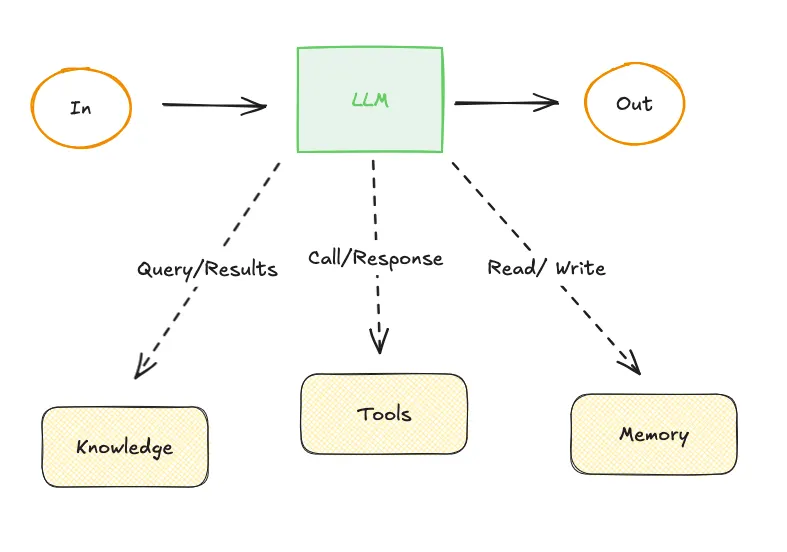
Think of these augmentations as giving the AI “tools” it can reach for when needed. These tools can be anything from custom search queries to database connections to domain-specific knowledge about your systems. They transform the model from a text generator into an active assistant that can accomplish tasks.
Let’s break down each augmentation:
Knowledge: The ability to query and retrieve information from external sources. Instead of relying solely on training data, the agent can search databases, documentation or the web to get current, accurate information.
Tools: The ability to take actions, run commands, execute SQL queries, call APIs or interact with external systems. This transforms the LLM from a text generator into something that can accomplish tasks.
Memory: The ability to read from and write to persistent storage, allowing the agent to remember context across conversations, learn from past interactions and maintain state.
A Simple Example: Web Search
Let’s see how this works with a concrete example.
If you ask a standard LLM, “Show me recent news about IBM i,” it has a problem. Models are trained on data up to a certain cutoff date so they don’t have access to current events or the live internet. The model would likely make up plausible-sounding but incorrect information (a phenomenon called “hallucination”).
But what if we give the model a tool like web search capabilities?
Now when you ask the same question, the agent can:
- Recognize it needs current information
- Use its web search tool to find recent articles
- Read the actual search results
- Use those results to give you an accurate, up-to-date answer
Same question. Different outcome. The augmentation changed everything.
This is the foundation: LLMs enhanced with augmentations become agents capable of interacting with real systems—like your IBM i environment.
What Are AI Agents?
Now that we understand how augmentations give LLMs capabilities, let’s see what makes something a true “agent.”
AI agents are autonomous programs powered by LLMs that don’t just generate text, they make decisions and take actions to accomplish goals.
While a chatbot stops after giving you an answer, an agent can execute a sequence of steps, check the results, adjust its approach, and keep working until the task is complete.
Think of AI agents as sophisticated automation that can:
- Understand context by reading data from your business systems and recognizing patterns in that data
- Make decisions by evaluating current conditions against objectives, even when situations don’t exactly match predefined rules
- Take actions across multiple systems and interfaces—querying databases, sending notifications, updating records—without constant human intervention
- Adapt their approach based on what they learn from each action, choosing different tools as the situation evolves

The Core Concept
Here’s a simple way to think about agents:
An AI agent runs tools in a loop to achieve a goal.
How it works (conceptually):
In simplified form, an AI agent looks something like this:
env = Environment()
tools = Tools(env)
system_prompt = "Goals, contraints, how to act"
task = "Peform task X, Y, Z"

while True:
    action = llm.run(task, system_prompt + env.state)
    env.state = tools.run(action)
Here is a breakdown of the different components:
- env (Environment): The system the agent is working in—in our case, your IBM i system
- tools: The specific capabilities we give the agent
- system_prompt: Instructions that define the agent’s role and constraints, e.g., “Here’s who you are and how you should behave”
- task: The user request or input
The Logic
Here’s what’s happening in the agent loop:
- Human input provides the initial goal or task.
- The LLM receives the task and decides what action to take.
- Action is executed in the environment (like querying your IBM i system).
- Feedback returns from the environment with results.
- The loop continues – The LLM uses the feedback to decide the next action.
- Stop occurs when the goal is achieved (or the agent determines it can’t proceed).
Why This Matters for IBM i
Here’s the exciting part: With just these components (environment, tools and instructions), you can build powerful AI agents for IBM i.
You don’t need complex architectures or advanced AI expertise. You need:
- Environment: A connection to your IBM i system
- Tools: SQL Services wrapped as agent tools (the knowledge and tools augmentations)
- Instructions: Clear guidelines for how the agent should behave (the system prompt)
The simplicity is the power.
What’s Next
In our next article on agentic AI and IBM i, we’ll look at how IBM i’s SQL-centric architecture makes building these components remarkably straightforward because the “tools” already exist as mature, documented SQL Services.