Navigating the Core: A Compendium of Traditional z/OS Interfaces
For "z/OS and Friends," Joe Gulla provides an overview of the interfaces that every feature, software product and application development environment relies on to communicate.
From the beginning of this series, “z/OS and Friends,” I have wanted to create a compendium of widely used interfaces with z/OS. It is a long-standing interest of mine as every OS feature, software product and application development environment is modular and relies on programmed interfaces to communicate and interact. In fact, the whole programming world is modular! Think about it for a few seconds and you are likely to agree with me, as modularity is an understated “holy grail of software” in the world of programming.
The IBM interfaces, at their best, can inspire us to emulate their facility and completeness. Since we are compelled to use them to do just about everything, it helps that they are very well thought-out. They get the job done and then some. Remember when IBM created the CICS command-level interface for application programs? I do. Command-level coding changed my programming life for the better instantly. Thank you, Hursley Lab, for developing this complete and modern interface that is still used today.
For this series, I have organized two articles with part one focused on four areas:
- System programming interfaces
- Application programming interfaces
- Command-line interfaces
- Data access Interfaces (access methods)
Part two, which will come later, discusses network and integration interfaces, security interfaces, monitoring and automation interfaces and development and DevOps interfaces.
System Programming Interfaces
In z/OS, there are two fundamental processor states that determine the level of privilege and access a program has—problem state and supervisor state. The typical program, even when it is written in assembler language and uses z/OS services, runs in problem state. Our “problem state” programs use z/OS services to get anything done so the interfaces are our friends, a way to tap into the rich world of z/OS services.
z/OS Base Control Program APIs
The z/OS Base Control Program supplies APIs that provide access to essential system functions such as job management, dataset handling, memory management and system services, enabling control over the z/OS environment. These APIs are typically used in assembler or C programs and are critical for writing system exits, utilities and performance-sensitive applications. Writing this kind of program is not an everyday occurrence. However, it is more common than you think.
Table 1 contains a list of commonly used z/OS assembler macros and their associated Supervisor Call (SVC) numbers. The macro names are meaningful and easy to understand after some examination. You need to know the context, the conventions for its use. I learned them in a four-and-a-half-day class and that was enough to get me started and make me productive.
Table 1. Common z/OS Assembler Macros and Their SVC Numbers
| z/OS Assembler Macro | What Services Are Called? |
| WAIT – Use the WAIT macro to wait for an event to take place before continuing processing. | SVC 1 |
| POST – Use the POST macro to signal a task that the event it is waiting for has taken place. | SVC 2 |
| ABEND – Use the ABEND macro to abnormally terminate the active task. | SVC 13 |
| GETMAIN – Use the GETMAIN macro to obtain a contiguous block of virtual storage. | SVC 4, 10, 120 |
| FREEMAIN – Use the FREEMAIN macro to free a contiguous block of storage. | SVC 5, 10, 120 |
| LINK – Use the LINK macro to pass control to a certain entry point in another load module with the intent that control will eventually return to the program issuing the instruction. | SVC 6 |
| XCTL – Use the XCTL macro to pass control to a program, expecting never to regain it. | SVC 7 |
| OPEN – Use the OPEN macro to connect program and data. | SVC 19, 22 |
| CLOSE – Use the CLOSE macro to disconnect program and data. | SVC 20, 23 |
| WTO / WTOR – Use the WTO macro to send a message to the virtual machine console, requiring no reply. Use the WTOR macro to send a message to the virtual machine console, requiring a reply. | SVC 35 |
| ENQ / DEQ – Use the ENQ macro to request control of a serially reusable resource. Use the DEQ macro to release control of a serially reusable resource. | SVC 56 / 48 |
| ATTACH – Use the ATTACH macro to set up a new subtask. | SVC 42 |
| STIMER – Use the STIMER macro to set a timer to a given time period. When time is up, your task will be notified. | SVC 47 / 46 |
| SDUMP – Use the SDUMP macro to request a recording of the contents of your virtual machine’s storage. | SVC 51 |
| DYNALLOC – Use DYNALLOC to perform dynamic data set allocation. | SVC 99 |
| XLATE – Use the XLATE macro to convert the data in an area in virtual storage from ASCII code to EBCDIC code or from EBCDIC code to ASCII code. | SVC 103 |
Below is a simple IBM z/OS assembler program example that demonstrates the use of the WAIT macro. This macro causes the program to pause until an event occurs, which is typically signaled by a POST. I use the phrase “Jack and Jill” to remember the relationship between WAIT and POST.
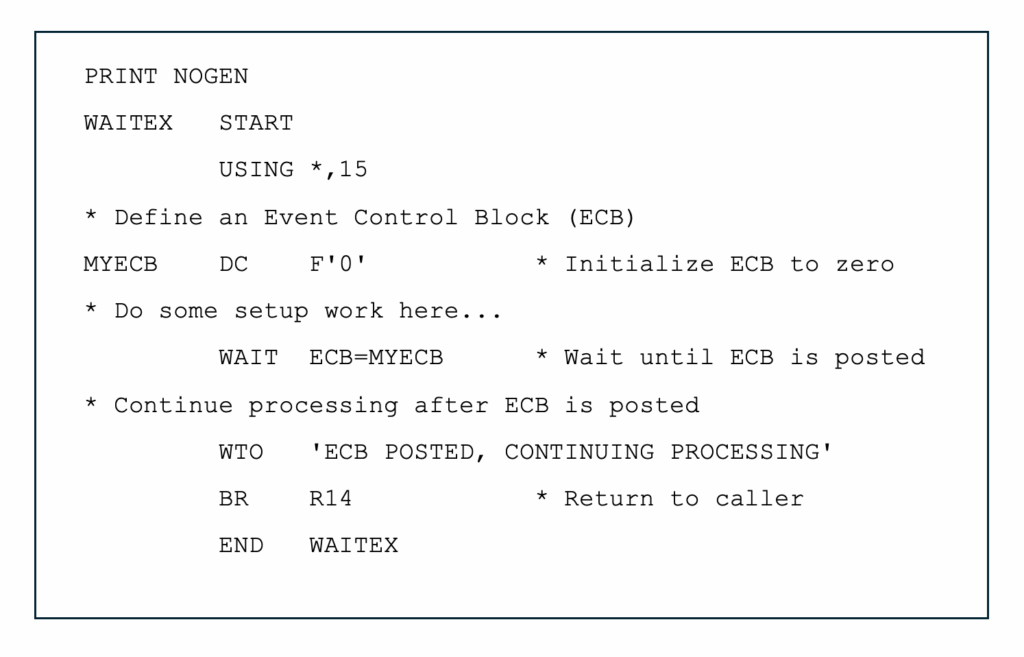
What does the program do?
The program uses DC F’0′ to define a 4-byte field initialized to zero, used as the Event Control Block (ECB), a simple tool to coordinate the WAIT and POST events. The WAIT ECB=MYECB macro issues SVC 1 to wait until the ECB is posted. To make this work in a real application, another task must POST the MYECB to resume execution. This is a way to coordinate activities within a multiprocessing application.
The WTO macro writes a message to the operator console (uses SVC 35) and the BR R14 instruction returns control to the calling program.
z/OS UNIX APIs
In parallel, the z/OS UNIX APIs extend POSIX-compliant interfaces to the mainframe, allowing developers to write portable C/C++ applications that interact with the UNIX System Services (USS) environment. These APIs support file I/O, process control, sockets and inter-process communication, making it possible to integrate USS-based applications into broader enterprise and open-source ecosystems.
Together, these interfaces for the z/OS BCP and USS environments form the backbone of system-level programming on z/OS, enabling both traditional and modern workloads to coexist and interoperate efficiently.
Control Blocks in z/OS – What Is the PSA, ASCB, TCB, JSCB?
In z/OS system programming, control blocks are important data structures. They represent and are used to manage various system resources and processes. Among the most fundamental are the Prefixed Save Area (PSA), Address Space Control Block (ASCB), Task Control Block (TCB) and Job Step Control Block (JSCB).
The PSA resides at the lowest addresses of each address space and contains essential system-level information such as interrupt handlers, system status and pointers to other control blocks. The ASCB represents an address space and contains information about its status, ownership and linkage to other control blocks like the TCB. The TCB represents an individual task within an address space and includes the task’s execution context, such as register contents and task status. The JSCB holds job-related information for a job step, including job name, accounting data and linkage to the ASCB.
These control blocks are interconnected and form the backbone of z/OS’s internal management of jobs, tasks and system resources, making them fundamental for system programmers who need to write exits, diagnose problems or develop system-level utilities.
Application Programming Interfaces
Application programming interfaces are important because they are the main way that application programs written in high-level languages request services from software subsystems like CICS, IMS, Db2 and MQ.
CICS Command-Level API
IBM’s CICS provides a comprehensive set of over 120 EXEC CICS commands that application programs can use to interact with the CICS environment. These commands span a wide range of functions as shown in Table 2.
Table 2. Common CICS Commands by Category
| Category | Command | Purpose |
| Terminal I/O | SEND | Send data to terminal |
| RECEIVE | Receive data from terminal | |
| SEND MAP | Send a BMS map | |
| RECEIVE MAP | Receive data into a BMS map | |
| Program Control | LINK | Call another program and return |
| XCTL | Transfer control to another program (no return) | |
| RETURN | Return control to CICS | |
| File Control | READ | Read a record from a file |
| WRITE | Write a record to a file | |
| REWRITE | Update a record in a file | |
| DELETE | Delete a record from a file | |
| Temporary Storage | WRITEQ TS | Write to temporary storage queue |
| READQ TS | Read from temporary storage queue | |
| DELETEQ TS | Delete a temporary storage queue | |
| Transient Data | WRITEQ TD | Write to transient data queue |
| READQ TD | Read from transient data queue | |
| Task Control | CHANGE TASK | Dynamically alter the priority of the currently running task |
| DEQ | Dequeues a resource, making it available for use by other tasks | |
| ENQ | Enqueues a resource, ensuring that only one task can use that specific resource at a time | |
| SUSPEND | Temporarily suspends the current task to allow other tasks to proceed | |
| WAITCICS | Causes the issuing task to be suspended until a specified event control block (ECB) has been posted | |
| WAIT EXTERNAL | Similar to WAITCICS, this command suspends a task until a z/OS-posted ECB indicates an external event has completed | |
| System Services | ABEND | Terminate the task abnormally |
| INQUIRE | Get system or resource information | |
| ASSIGN | Get task-related information (e.g., terminal ID) | |
| Time & Date | ASKTIME | Get current date and time |
| FORMATTIME | Format time for display | |
| Storage Management | GETMAIN | Allocate dynamic memory |
| FREEMAIN | Free allocated memory |
Here’s a simple COBOL CICS program that demonstrates the use of the CICS SEND and RECEIVE commands to interact with a terminal. This is a basic conversational program that prompts the user for input and then echoes it back. For simplicity, only the PROCEDURE DIVISION is shown.
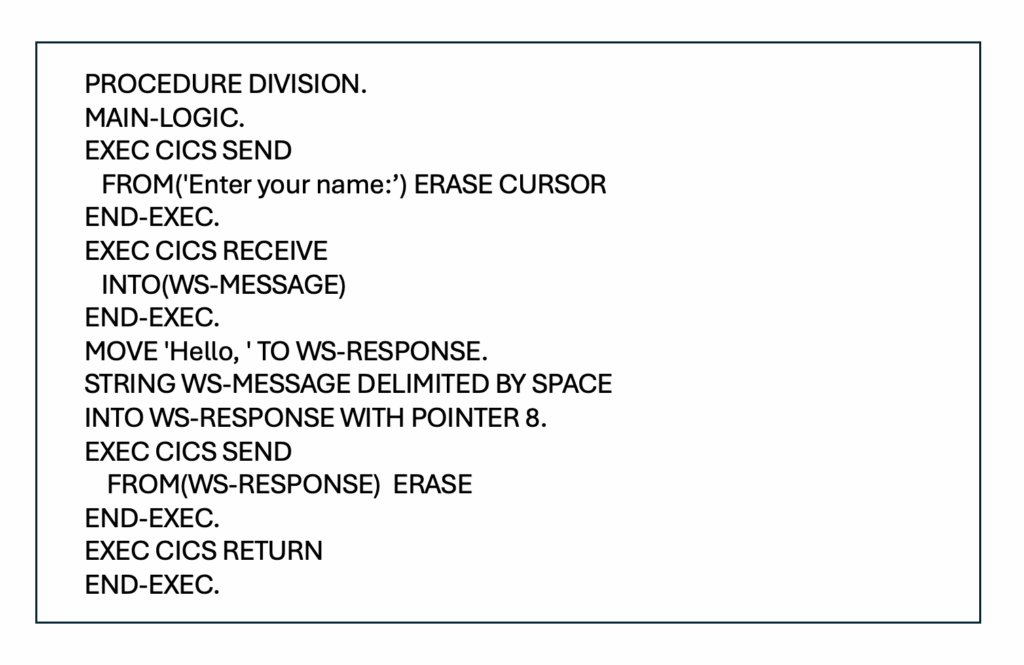
What does the program do?
The SEND command displays the message “Enter your name:” and positions the cursor for input. The RECEIVE command waits for the user to type a response. The SEND command displays a greeting using the input preceded by the word Hello. Finally, the RETURN command ends the transaction.
The odd thing about this little program is not obvious. There is a general understanding in CICS application programming that the programmer should not do anything that results in a wait involving the terminal (input/output device), expressed or implied, that causes CICS to keep all program resources “on hold” until the wait is satisfied. In the above example, the SEND command has an implicit wait until there is a response from the terminal.
The better approach is called pseudo-conversational CICS programming. In the above case, the program would RETURN after the SEND, leaving behind data in the COMMAREA that would let it know that the SEND was completed and it was time to RECEIVE the message. This approach really makes a difference in resource use with “real” applications that are typically much larger and more involved than this simple program in Figure 2.
IMS Transaction Manager API
IBM IMS Transaction Manager (IMS TM) provides a set of Data Language/I (DL/I) calls that application programs use to interact with the IMS environment. These calls are used for message processing, transaction control and communication with terminals or other systems. There are 12 primary DL/I function codes (commands) specifically used for transaction management, as well as system-service calls by application programs. These commands are shown in Table 3, below.
Table 3. IMS TM DL/I Transaction Management and System Services Calls
| Function Code | Purpose | |
| IMS TM Transaction Management Calls | AUTH | Authorization check |
| CHNG | Change destination on an alternate PCB | |
| CMD | Issue IMS commands | |
| GCMD | Get subsequent command responses | |
| GN | Get Next message segment | |
| GU | Get Unique (first message segment) | |
| ICAL | IMS Call (invoke non-IMS services synchronously) | |
| IMS TM System Service Calls | CHKP | Checkpoint saves application state for restart |
| DLET | Delete message segment | |
| ISRT | Insert message segment into the message queue | |
| APSB | Activate PSB dynamically | |
| DPSB | Deactivate PSB dynamically |
Here’s a simple COBOL IMS Transaction Manager example that demonstrates how a message-driven application might use DL/I calls to receive input from a terminal and send a response back.
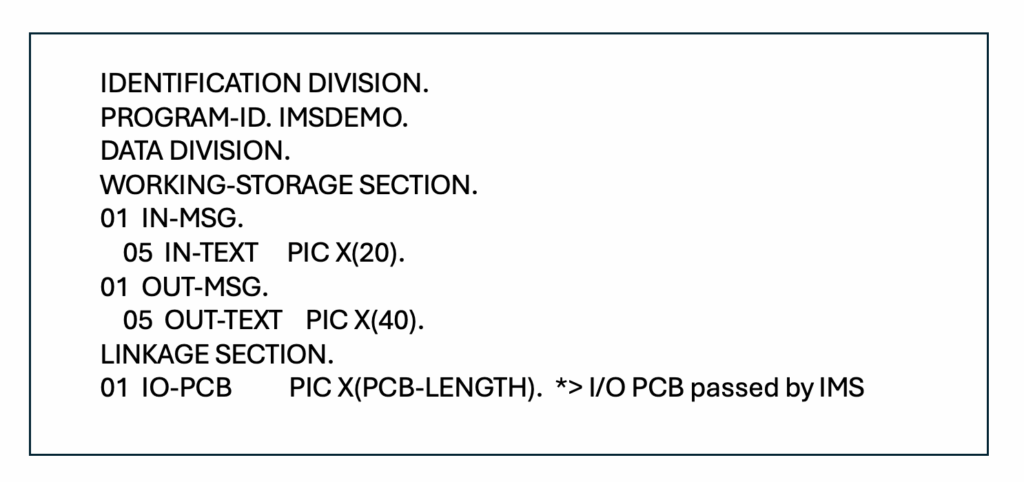
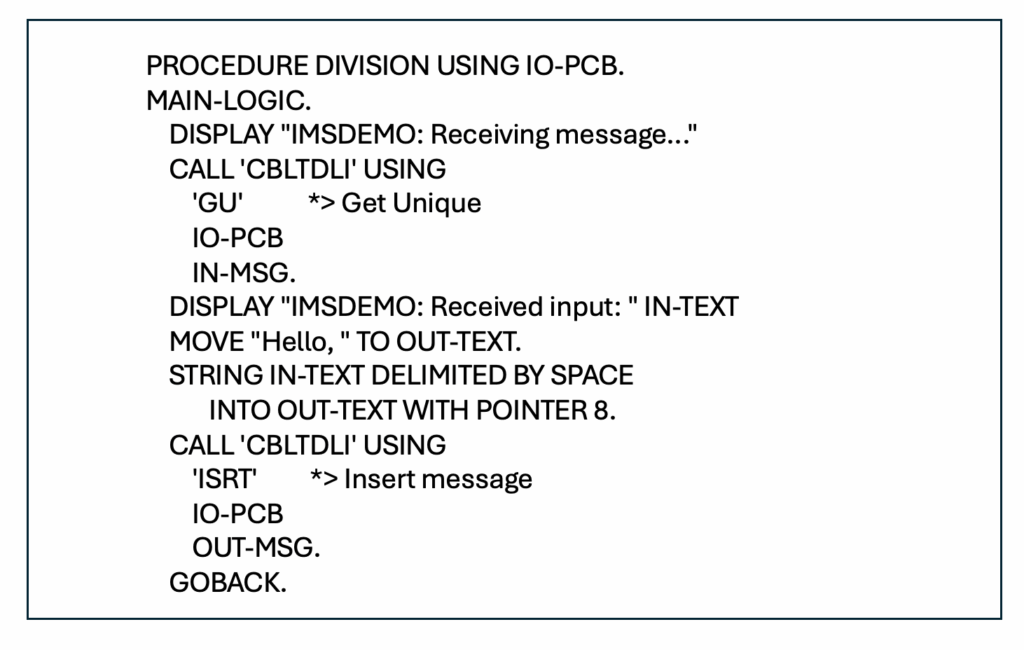
What does the Program do?
The GU call retrieves the input message from the terminal. The ISRT call sends a response message back to the terminal. The IO-PCB is the I/O Program Communication Block passed by IMS to the program. Note: CBLTDLI is the standard entry point for DL/I calls in COBOL.
Db2 Call Level Interface
The IBM Db2 Call Level Interface, which is based on the Open Database Connectivity (ODBC) and ISO/IEC SQL/Call Lever Interface standards, provides a comprehensive set of over 80 function calls that application programs can use to interact with Db2 databases.
The Db2 Call Level Interface can be used in two main ways in relation to z/OS. Client applications running on distributed platforms like Linux, UNIX and Windows can use the Db2 Call Level Interface and the IBM Data Server Driver for ODBC and interface to connect to a Db2 for z/OS server. Db2 Call Level Interface programs can also run directly on z/OS within the z/OS UNIX System Services environment. I have made hotlinks for all 23 functions in Table 4. Maybe, like me, you want more details on some Db2 command functions.
Table 4. Key Categories of Call Level Interface Functions
| Category | Functions |
| Connection Management | SQLConnect – Connect to a data source |
| SQLDisconnect – Disconnect from a data source | |
| SQLDriverConnect – Connect to a data source | |
| Statement Execution | SQLExecDirect – Execute a statement directly |
| SQLPrepare – Prepare a statement | |
| SQLExecute – Execute a statement | |
| Result Handling | SQLFetch – Fetch next row |
| SQLBindCol – Bind a column to an application variable or LOB locator | |
| SQLGetData – Get data from a column | |
| Transaction Control | SQLEndTran – End transactions of a connection or an environment |
| SQLTransact – Transaction management | |
| Error Handling | SQLGetDiagRec – Get multiple fields settings of diagnostic record |
| SQLGetDiagField – Get a field of diagnostic data | |
| Metadata Queries | SQLTables – Get table information |
| SQLColumns – Get column information for a table | |
| SQLPrimaryKeys – Get primary key columns of a table | |
| Environment Setup | SQLAllocHandle – Allocate handle |
| SQLSetEnvAttr – Set environment attribute | |
| SQLFreeHandle – Free handle resources | |
| Data Binding | SQLBindParameter – Bind a parameter marker to a buffer or LOB locator |
| SQLSetParam – Bind a parameter marker to a buffer or LOB locator | |
| Cursor Management | SQLSetCursorName – Set cursor name |
| SQLCloseCursor – Close cursor and discard pending results |
These functions allow developers to connect to and disconnect from databases, execute SQL statements dynamically, retrieve and manipulate result sets, manage transactions including handle errors and diagnostics, and query metadata about database objects.
Message Queue Interface
The IBM MQ Message Queue Interface (MQI) provides a set of over 25 core API calls that application programs can use to interact with the MQ queue manager. These calls are used for connecting, messaging, transaction control and managing message properties. Table 5 has a categorized list of the main MQI calls.
Table 5. Key Categories and Functions of the MQI
| Category | Function Provided |
| Connection Management | MQCONN – Connect to a queue manager |
| MQCONNX – Connect with options | |
| MQDISC – Disconnect from a queue manager | |
| Object Management | MQOPEN – Open a queue or topic |
| MQCLOSE – Close a queue or topic | |
| Message Handling | MQPUT – Put a message on a queue |
| MQPUT1 – Put a single message on a queue | |
| MQGET – Get a message from a queue | |
| Publish/Subscribe | MQSUB – Subscribe to a topic |
| MQSUBRQ – Request publications | |
| Transaction Control | MQBEGIN – Begin a unit of work |
| MQCMIT – Commit a unit of work | |
| MQBACK – Back out a unit of work | |
| Object Attributes | MQINQ – Inquire about object attributes |
| MQSET – Set object attributes | |
| Message Properties & Handles | MQCRTMH – Create a message handle |
| MQDLTMH – Delete a message handle | |
| MQSETMP – Set a message property | |
| MQINQMP – Inquire about a message property | |
| MQDLTMP – Delete a message property | |
| MQBUFMH / MQMHBUF – Convert between message handles and buffers | |
| Asynchronous Messaging | MQCB – Register a callback |
| MQCTL – Control callback processing | |
| MQSTAT – Get status of asynchronous operations |
Command-Line Interfaces
Many software tools have command-line interfaces (CLI). A CLI is useful for activities that you perform repeatedly. For example, if you are a COBOL programmer and you are submitting JCL to perform compiles, you would use the SUBMIT line comment when using TSO.
TSO/E Commands (Time Sharing Option/Extensions)
TSO/E provides an interactive command-line interface for users to communicate with z/OS. Table 6 shows some common TSO/E commands:
Table 6. TSO Commands
| What? | How? |
| Submitting and managing JCL jobs | SUBMIT, STATUS and OUTPUT |
| Allocating datasets | ALLOCATE and FREE |
| Editing files | EDIT and BROWSE |
| Running REXX or CLIST scripts | Use the name of any REXX EXEC or CLIST to cause it to run |
ISPF Panels (Interactive System Productivity Facility)
ISPF provides a menu-driven interface layered on top of TSO for easier navigation and task execution. The panels interface in a way that “gets you started” then you use line commands within the panels. For example, when editing a dataset, you can input the letter d to delete a line or dd plus dd to delete a block of line, etc. Table 7 shows what ISPF is commonly used for:
Table 7. Useful ISPF Functions
| What? | How? |
| Edit datasets with full-screen editors | To access the editor, select 2 from the ISPF Primary Option Menu and, on the Edit Entry panel, enter the name of the data set that you want to create or modify. |
| Browse and managing datasets | To browse (view) a dataset, select 1 from the ISPF Primary Option Menu and, on the View Entry panel, enter the name of the data set that you want to browse. |
| Navigating system utilities and tools | Option 9 provides an interface to other IBM program development products. It displays a panel that lists other IBM products that are supported as ISPF dialogs. |
| Accessing SDSF for job output and system logs | SDSF is a command that can be entered from the ISPF main menu after entering option 6 (command). |
Many IBM products use ISPF to provide an interactive, panel-based user interface on the mainframe. Here are several examples:
- Workload Manager (WLM) provides an ISPF application for managing system workloads.
- Hardware Configuration Definition (HCD) uses ISPF panels for I/O configuration.
- System Modification Program/Extended (SMP/E) is a utility for installing and maintaining IBM software on z/OS which has an ISPF interface.
- Resource Measurement Facility (RMF) provides an ISPF interface for performance monitoring.
- zSecure Admin is a security administration product that has a full ISPF panel interface.
- OMEGAMON for z/OS can be run in ISPF mode as a standalone application for monitoring.
- Db2 for z/OS uses ISPF for certain administrative and utility functions.
OMVS Shell (UNIX System Services)
The OMVS Shell provides a UNIX-like shell environment within z/OS, enabling POSIX-compliant scripting and tools. OMVS is not a CLI itself, but it is the name for the command-line interface environment in z/OS USS. Table 8 shows what the OMVS Shell is used for:
Table 8. OMVS Functions
| What? | Examples |
| Run shell scripts and UNIX commands | ls, grep, chmod and many others |
| Manage HFS/zFS file systems | MOUNT, BPXWMIGF and zfsadm command suite |
| Run Java, Python or other UNIX-based applications | Use standard UNIX commands directly at the shell prompt |
Zowe CLI
The Zowe CLI is a modern, open-source command-line interface that allows users to interact with z/OS using familiar CLI syntax and REST APIs. Table 9 shows what the ZOWE CLI is used for:
Table 9. Zowe CLI Use
| What? | How? |
| Submitting JCL and retrieving job output | Use the Zowe jobs submit local-file command to submit a local JCL file and then the Zowe jobs download command with the job ID to get the output. |
| Interacting with datasets, USS files and z/OSMF workflows | The Zowe zos-files and Zowe zos-jobs command groups are primarily used for dataset interaction. Listing datasets and members. |
| Automating DevOps pipelines and integrating with tools like Jenkins or Git | This is a multi-step activity involving Zowe profiles and tailoring definitions in Jenkins or Git. |
Data Access Interfaces
Here’s an explanation of the importance of data access interfaces in IBM z/OS, focusing on VSAM, QSAM and BSAM—three foundational access methods that define how programs interact with datasets.
Virtual Storage Access Method (VSAM)
VSAM is a high-performance access method for managing complex data structures in z/OS. It supports indexed, sequential and relative record access. The key VSAM dataset types are included in Table 10.
Table 10. VSAM Dataset types and Characteristics
| Dataset Types | Characteristics of the Dataset |
| Key-Sequenced Data Set (KSDS) | Logical records are placed in the data set in ascending collating sequence by a key field. |
| Entry-Sequenced Data Set (ESDS) | Records are added only at the end of the data set and existing records cannot be deleted. |
| Relative Record Data Set (RRDS) | Records are identified by their relative record number (RRN). The first record in the data set is RRN 1, the second is RRN 2, and so on. |
| Linear Data Set (LDS) | Contains data that can be accessed as byte-addressable strings in virtual storage. |
VSAM enables fast, indexed access to records using keys. VSAM supports dynamic record insertion, deletion and updates. It is widely used in CICS, IMS and batch applications and offers data integrity and recovery features.
Below is a COBOL program that works with a VSAM key-sequenced dataset. Figure 5 is the ID and Environment Division statements. Figure 6 contains the Data Division and Figure 7 contains the Procedure Division.
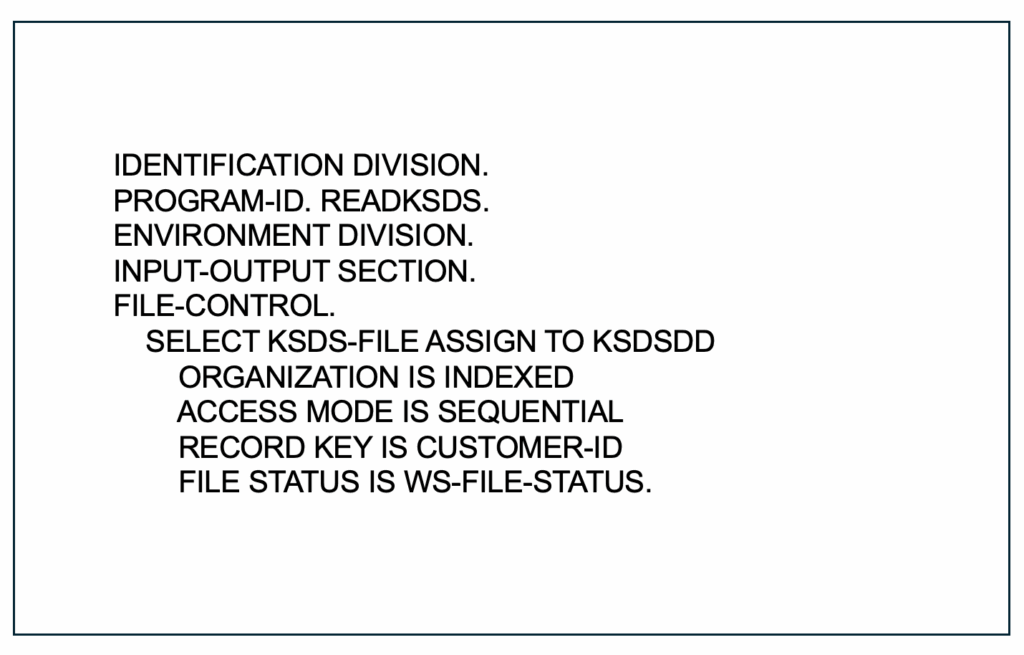
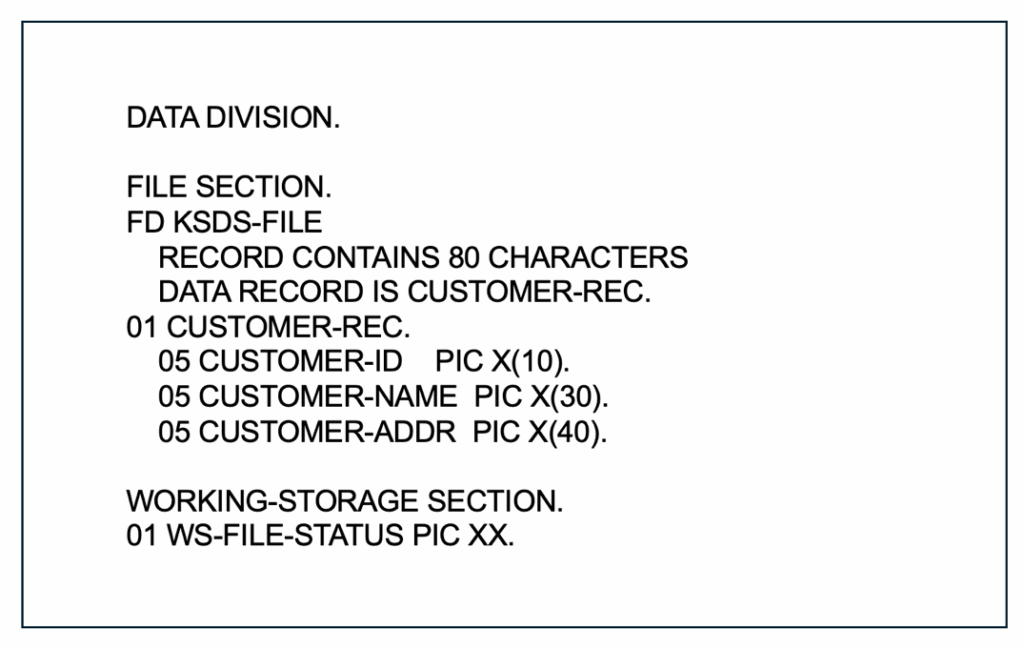
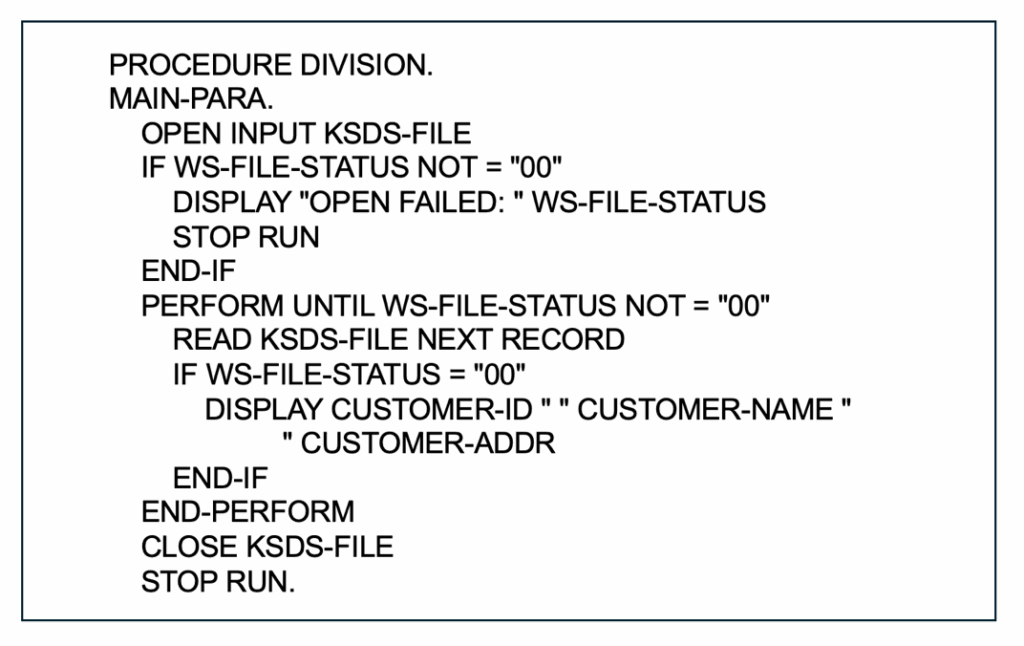
What does the program do?
Keep in mind that the ORGANIZATION IS INDEXED (a KSDS file) and ACCESS MODE IS SEQUENTIAL which means that the program reads all records in key order. The READ NEXT RECORD retrieves the next record in sequence and displays Customer ID, Name, and Address for each record. In VSAM, FILE STATUS “10” means end-of-file for sequential access. Since this is a non-zero file status, the loop to read the records ends. A clearer way to handle this would be to add this statement to the program: IF WS-FILE-STATUS = “10” DISPLAY “END OF FILE REACHED.”
Queued Sequential Access Method (QSAM)
QSAM is a high-level, buffered access method for reading and writing sequential datasets. QSAM simplifies I/O by queuing records in memory buffers. QSAM is ideal for line-by-line processing of sequential files. It is commonly used in COBOL and PL/I batch programs and supports both fixed and variable-length records.
In IBM mainframe environments, the primary macros used to access and process QSAM files in assembler language programs are OPEN, GET, PUT, PUTX and CLOSE.
Table 11. QSAM Macros
| Macro Instruction | Function |
| OPEN | Prepares the file for processing (input, output or update). |
| GET | Obtains the next logical record from an input file. |
| PUT | Writes a logical record to an output file. |
| PUTX | Writes a record to the file, also used for updating records in place in certain modes. |
| CLOSE | Terminates the processing of the file and frees control blocks. |
| DCB | Defines the characteristics of the data (e.g., record format, block size) within the program itself during assembly. |
Basic Sequential Access Method (BSAM)
BSAM is a low-level, unbuffered access method for sequential datasets, giving the programmer more control over I/O operations. BSAM is used when precise control over block-level I/O is needed. It is suitable for binary data, non-standard formats or device-specific operations and is often used in assembler programs or system utilities.
The standard commands or macros used to access BSAM files are OPEN, CLOSE, READ, WRITE and CHECK. Other useful macros include NOTE to get the relative position of the last block and POINT to reposition to a previously noted location. These commands are used for block-oriented sequential file access in mainframe environments.
Table 12. BSAM Macros
| Type | Macro Name | Purpose |
| Core BSAM macros | OPEN | Prepares a file for processing by logically connecting it to your program. |
| CLOSE | Clears the file’s buffers and disconnects it from the program. | |
| READ | Retrieves a block of data from the file and places it into a specified area of storage. | |
| WRITE | Writes a block of data from storage to the file. | |
| CHECK | Verifies the completion and status of a preceding READ or WRITE operation. This is crucial for handling I/O errors and end-of-file conditions. | |
| Additional BSAM macros | NOTE | Returns the relative position (block number) of the last block read or written. |
| POINT | Repositions the file pointer to a location identified by a previous NOTE macro, allowing for direct access-style processing within a sequential file. |
These access methods are critical to the performance, reliability and flexibility of z/OS applications. They allow developers to choose the right tool for the job—whether it’s high-speed indexed access (VSAM), simple sequential processing (QSAM), or low-level control (BSAM). Finally, there is an extensive set of macros for assembler-language development for VSAM and non-VSAM dataset handling. You can learn a lot just by browsing the macro names and brief descriptions.
What Is Next?
The next article in this series will focus on four additional interface categories:
- Network and integration
- Security monitoring
- Automation
- Development and DevOps
These four categories, plus the others discussed in this article, will round out this yearlong exploration of z/OS and much of its interconnected and worthwhile software.