July TechPulse Recap: Hybrid Cloud

For July, TechPulse surveyed IBM Power professionals on how they’re distributing workloads across on-premises and cloud infrastructure, where their biggest hybrid cloud headaches lie and whether their IBM i shops could keep printing critical forms and labels if the internet went down—among other questions.
The sample size of eight respondents was smaller than TechPulse’s recent surveys, but the small group of technologists was spit into two: some shops are pushing workloads to the cloud in earnest, while just as many are holding the line entirely on-premises.
Workload migration: no clear majority, in either direction.
Asked which workloads they’ve moved fully or partially to the cloud, respondents were just as likely to say “none” as they were to name any single workload category. Three of eight respondents said all their workloads remain on-premises, while moving development/test environments and backup and disaster recovery to the cloud were the most popular destination for workloads. Databases, web/customer-facing applications, analytics/BI/AI/ML workloads and back-office systems (HR/payroll, CRM/ERP, email/collaboration) were each cited by two respondents. One respondent specified another workload under “Other.”

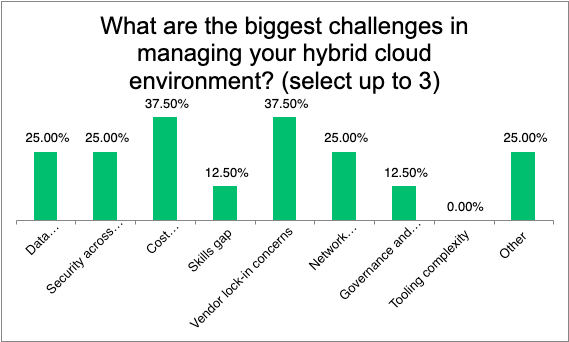
Cost management and vendor lock-in top the list of hybrid cloud headaches.
When asked to select up to three of their biggest challenges in managing a hybrid cloud environment, respondents most commonly cited cost management/visibility and vendor lock-in concerns—each cited three times. Data integration/synchronization, security across environments, network latency/connectivity and “other” concerns were each selected by two respondents. Skills gap and governance/compliance were each named by one respondent. No one flagged tooling complexity as a top-three concern.
IBM Cloud and hosted/colocated data centers were the most common cloud partners—but the field is fragmented.
Asked which cloud providers they’re running alongside their on-premises infrastructure, respondents split their business across a wide range of options. IBM Cloud and hosted/colocated third-party data centers tied as the most common answer, each cited by three respondents. AWS and Azure were each in use at two shops, while Google Cloud and Oracle Cloud were each named by one respondent. One respondent (12.5%) reported using no cloud provider at all alongside their on-premises infrastructure.

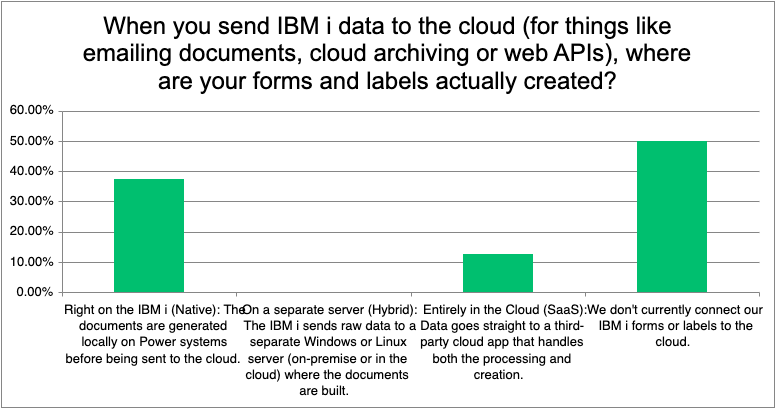
Half of IBM i shops haven’t connected their forms and labels to the cloud at all.
Turning to how organizations handle document generation for cloud-connected processes—emailing documents, cloud archiving or web APIs—half of respondents said they don’t currently connect their IBM i forms or labels to the cloud in any capacity. Of those who have, three said forms and labels are generated natively, right on the IBM i, while one respondent said the process happens entirely in the cloud through a third-party SaaS app. No respondents reported a hybrid setup in which a separate server handles form generation before data reaches the cloud.
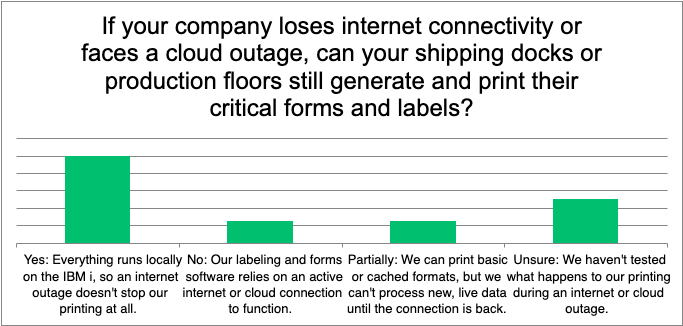
Most shops could keep printing through an outage—but some haven’t tested that.
Perhaps the most reassuring finding of the survey: Four of eight respondents said their shipping docks and production floors could still generate and print critical forms and labels during an internet or cloud outage, because everything runs locally on the IBM i. One respondent said their labeling and forms software depends on an active internet or cloud connection and would go down entirely, and another said they could only print basic or cached formats without processing anything new. Two respondents said they simply haven’t tested what would happen to their printing during an outage—a gap between confidence and verification that mirrors what TechPulse has found in other resilience-focused surveys this year.
This report was generated with AI assistance.